Satış ve Stoklama programının kodları…
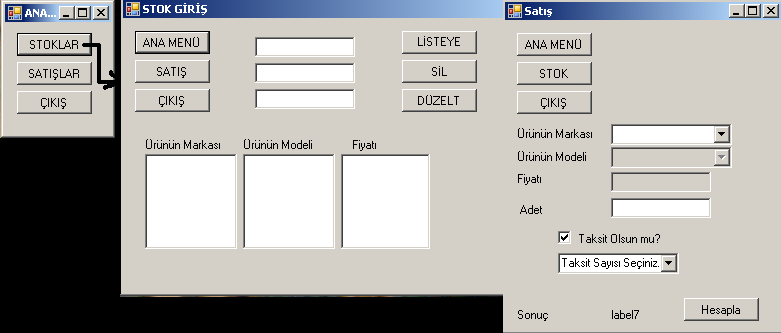
[code lang=”csharp”]
//FORM1’in içerisine yazılacak kodlar
public partial class Form1 : Form
{
public Form1()
{
InitializeComponent();
}
private void button1_Click(object sender, EventArgs e)
{
Form2 frm2 = new Form2(); //form2 yi frm2 diye değişken diye tanıtıyoruz
frm2.Show(); //frm2 açılıyor
this.Hide(); //mevcut form gizleniyor
}
private void Form1_Load(object sender, EventArgs e)
{
}
private void button2_Click(object sender, EventArgs e)
{
Form3 frm3 = new Form3();
frm3.Show();
this.Hide();
}
private void button3_Click(object sender, EventArgs e)
{
Close();
}
}
}
// FORM2nin içerisine Yazılacak Kodlar
public partial class Form2 : Form
{
string[] model = new string[50];
string[] marka = new string[50];
string[] fiyat = new string [50];
int sayi;
int a1,a2,a3;
public Form2()
{
InitializeComponent();
}
private void button1_Click(object sender, EventArgs e)
{
Form1 frm1 = new Form1();
frm1.Show();
this.Hide();
}
private void Form2_Load(object sender, EventArgs e)
{
a1 = 0; //a1 değişkenini form yüklenirken 0 a eşitliyoruz
a2 = 0; //a1 değişkenini form yüklenirken 0 a eşitliyoruz
a3 = 0; //a1 değişkenini form yüklenirken 0 a eşitliyoruz
}
private void button2_Click(object sender, EventArgs e)
{
int b1,b2,b3; //yerel değişken tanımlıyoruz
Form3 frm3 = new Form3(); //form3 ü tanımlıyoruz
frm3.Show(); //form3 ü açtık
this.Hide(); //mevcut formu gizledik
for (b1=0 ;b1frm3.comboBox1.Items.Add(marka[b1]); //marka dizisindeki verileri form3deki combobox a yazdırıyoruz
for (b2 = 0; b2 < a2; b2++)
frm3.comboBox2.Items.Add(model[b2]);
for (b3=0; b3frm3.listBox1.Items.Add(fiyat[b3]);
}
private void button3_Click(object sender, EventArgs e)
{
Close(); //çıkış kodu
}
private void label3_Click(object sender, EventArgs e)
{
}
private void button4_Click(object sender, EventArgs e)
{
listBox1.Items.Add(textBox1.Text); //textbox1 deki veriyi liste ekler
listBox2.Items.Add(textBox2.Text); //textbox2 deki veriyi liste ekler
listBox3.Items.Add(textBox3.Text); //textbox3 deki veriyi liste ekler
marka[a1] = textBox1.Text; //marka dizisinin içine textbox1deki veriyi atıyoruz
model[a2] = textBox2.Text; //model dizisinin içine textbox1deki veriyi atıyoruz
fiyat[a3] = textBox3.Text; //fiyat dizisinin içine textbox1deki veriyi atıyoruz
//modelleri değişkene atıyoruz
a1++; // a1 yı arttırıyoruz amacımız yeni kayıt eklendiğinde a1=0 üzerine eklemesin a1=1 üzerine eklesin
a2++; // a2 yı arttırıyoruz
a3++; // a3 yı arttırıyoruz
textBox1.Text = ""; //textbox1 in içini temizliyoruz
textBox2.Text = ""; //textbox2 in içini temizliyoruz
textBox3.Text = ""; //textbox3 in içini temizliyoruz
}
private void button7_Click(object sender, EventArgs e)
{
}
private void button8_Click(object sender, EventArgs e)
{
}
private void button5_Click(object sender, EventArgs e)
{
listBox1.Items.Remove(listBox1.SelectedItem);
listBox2.Items.Remove(listBox2.SelectedItem);
listBox3.Items.Remove(listBox3.SelectedItem);
//listlerin içinddekini siliyoruz.
}
private void listBox1_SelectedIndexChanged(object sender, EventArgs e)
{
try
{
sayi = listBox1.Items.IndexOf(listBox1.SelectedItem); //sonunda başardık seçili olanın kaçıncı sırada olduğunu buluor
listBox2.SelectedIndex = sayi; //burda asıl olay oluyor.
listBox3.SelectedIndex = sayi;
//3 ünde de listleri eşitleidk
//amacımız list1 dekini seçtiğinde 2.liste ve 3.listekide aynı sırada olsun
}
catch
{
}
}
private void listBox2_SelectedIndexChanged(object sender, EventArgs e)
{
try
{
sayi = listBox2.Items.IndexOf(listBox2.SelectedItem); //sonunda başardık seçili olanın kaçıncı sırada olduğunu buluor
listBox1.SelectedIndex = sayi; //burda asıl olay oluyor.
listBox3.SelectedIndex = sayi;
//3 ünde de listleri eşitleidk
//amacımız list1 dekini seçtiğinde 2.liste ve 3.listekide aynı sırada olsun
}
catch
{
}
}
private void listBox3_SelectedIndexChanged(object sender, EventArgs e)
{
try
{
sayi = listBox3.Items.IndexOf(listBox3.SelectedItem); //sonunda başardık seçili olanın kaçıncı sırada olduğunu buluor
listBox1.SelectedIndex = sayi; //burda asıl olay oluyor.
listBox2.SelectedIndex = sayi;
//3 ünde de listleri eşitleidk
//amacımız list1 dekini seçtiğinde 2.liste ve 3.listekide aynı sırada olsun
}
catch
{
}
}
private void button6_Click(object sender, EventArgs e)
{
try
{
//kodlar kapalı görünüyor
}
catch
{
MessageBox.Show("Lütfen listten elemanı seçin");
}
}
}
}
//FORM3ün İçerisine Yazılacak Kodlar
public partial class Form3 : Form
{
public Form3()
{
InitializeComponent();
}
private void Form3_Load(object sender, EventArgs e)
{
}
private void button1_Click(object sender, EventArgs e)
{
Form1 frm1 = new Form1();
frm1.Show();
this.Hide();
}
private void button2_Click(object sender, EventArgs e)
{
Form2 frm2 = new Form2();
frm2.Show();
this.Hide();
}
private void button3_Click(object sender, EventArgs e)
{
Close();
}
private void comboBox1_SelectedIndexChanged(object sender, EventArgs e)
{
int sayi;
Form2 frm2 = new Form2();
sayi = comboBox1.Items.IndexOf(comboBox1.SelectedItem); //sonunda başardık seçili olanın kaçıncı sırada olduğunu buluor
comboBox2.SelectedIndex = sayi; //burda asıl olay oluyor.
listBox1.SelectedIndex=sayi; //burdada hile yapıyoruz
textBox1.Text = listBox1.Text; //liste aktarıyoruz
}
private void button4_Click(object sender, EventArgs e)
{
//textBox2.Text= comboBox1.SelectedItem.ToString(); seçili olnanı atıyor
//sayi= comboBox1.Items.Count; //bu kodda kaç tane olduğunu söylüyor
//sayi = comboBox1.Items.Count(comboBox1.SelectedItem);
//comboBox2.SelectedItem = sayi.ToString();
//comboBox2.Items.IndexOf(sayi);
}
private void checkBox1_CheckedChanged(object sender, EventArgs e)
{
if (checkBox1.Checked == true)
comboBox3.Visible = true;
else
comboBox3.Visible = false;
}
private void comboBox3_SelectedIndexChanged(object sender, EventArgs e)
{
}
private void button5_Click(object sender, EventArgs e)
{
int fyt, adet,taksit;
try
{
fyt = int.Parse(textBox1.Text);
adet = int.Parse(textBox2.Text);
if (checkBox1.Checked == true)
{
taksit = int.Parse(comboBox3.Text);
label7.Text = (fyt * adet + (fyt * adet * taksit * 2 / 100)).ToString();
}
else
label7.Text = (fyt * adet).ToString();
}
catch
{
MessageBox.Show("Lütfen Adet Sayısını Düzeltiniz…");
}
}
}
} [/code]
yaptıgınız program yada program demeyeyim programmların hepsi süper ellerine sağlık devamını bekleriz
Teşekkürler sizlerden gelen istekler doğrultusunda elimizden geleni yapmaya çalışıyoruz
MERHABA ÇALIŞMALARINI ÇOK GÜZEL SQL VERİTABANI İLE PROJELERİNİZ DE OLACAKMI ACABA?
İkinci Dönem itibarıyla veritabanlı örnekleri yayınlamayı düşünüyoruz. İlginiz ve iltifatlarınız için teşekürler. Kolay gelsin.
cok guzel calismalar.Basarilar
Programlar çok güzel, ellerinize sağlık.Ben bu programı çalıştıramadım ComboBox ve ListBoxlarda hata veriyor.Arayüzde herşey tamam niye hata veriyo çözemedim yardımcı olursanız sevinirim..
Denedim. Bir sorun yok.Bende çalışıyo, hata vermiyo.
bu programa resim eklemek için ve veri tabanına baklama için access veya sql server 2005 nasıl yapabilir
merhaba yarın stok takıp programı teslım etmem lazım ancak hıcbırsey yapamadım sızın projelerınızden ındırdım 1 tane ama o da vısual stdio da hata verdı acamadım lutfen bana cok acil yardımcı olurmusunuz:((( ıyı aksamlar
proje isteklerinizi gorselprogram@gmail.com adresine mail atınız.
s.a admin proje gerek acil stok veya başkada olur yardımcı olurmusunuz.
FATİH ÖZTÜRK:
Stok takip için aşağıdaki linki incele.
http://www.gorselprogramlama.com/stok-takip-programi-c/