Resim boyutunu (Enini ve Boyunu) isteğiniz değerlerle değiştir ve veri tabanına kaydet — Asp net
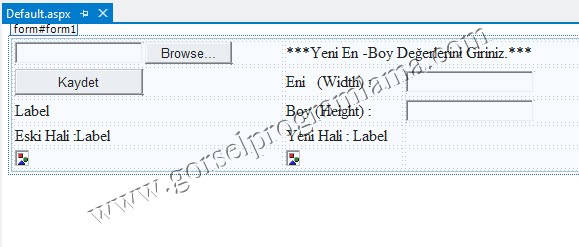
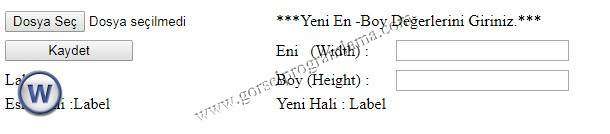
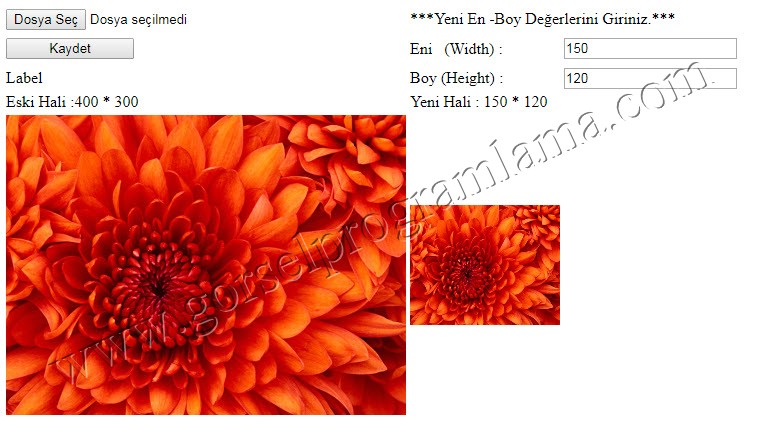
Default.aspx.cs
[code lang=”html”]
<%@ Page Language="C#" AutoEventWireup="true" CodeFile="Default.aspx.cs" Inherits="_Default" %>
<!DOCTYPE html PUBLIC "-//W3C//DTD XHTML 1.0 Transitional//EN" "http://www.w3.org/TR/xhtml1/DTD/xhtml1-transitional.dtd">
<html xmlns="http://www.w3.org/1999/xhtml">
<head runat="server">
<title>Asp.Net Çoklu Resim Yükleme</title>
<script src="js/jquery.js" type="text/javascript"></script>
<script src="js/multi.js" type="text/javascript"></script>
<style type="text/css">
.auto-style1 {
width: 100%;
}
.auto-style2 {
width: 267px;
}
.auto-style3 {
}
.auto-style4 {
width: 267px;
height: 30px;
}
.auto-style5 {
height: 30px;
}
.auto-style6 {
height: 30px;
width: 116px;
}
.auto-style7 {
width: 116px;
}
</style>
</head>
<body>
<form id="form1" runat="server">
<table class="auto-style1">
<tr>
<td class="auto-style2">
<asp:FileUpload ID="FileUpload1" runat="server" />
</td>
<td class="auto-style3" colspan="2">***Yeni En -Boy Değerlerini Giriniz.***</td>
</tr>
<tr>
<td class="auto-style4">
<asp:Button ID="Button1" runat="server" OnClick="Button1_Click" Text="Kaydet" Width="128px" />
</td>
<td class="auto-style6">Eni (Width) :</td>
<td class="auto-style5">
<asp:TextBox ID="TextBox1" runat="server"></asp:TextBox>
</td>
</tr>
<tr>
<td class="auto-style2">
<asp:Label ID="Label1" runat="server" Text="Label"></asp:Label>
</td>
<td class="auto-style7">Boy (Height) :</td>
<td>
<asp:TextBox ID="TextBox2" runat="server"></asp:TextBox>
</td>
</tr>
<tr>
<td class="auto-style2">Eski Hali :<asp:Label ID="Label2" runat="server" Text="Label"></asp:Label>
</td>
<td class="auto-style7">Yeni Hali :
<asp:Label ID="Label3" runat="server" Text="Label"></asp:Label>
</td>
<td> </td>
</tr>
<tr>
<td class="auto-style2">
<asp:Image ID="Image1" runat="server" />
</td>
<td class="auto-style7">
<asp:Image ID="Image2" runat="server" />
</td>
<td> </td>
</tr>
</table>
</form>
[/code]
[code lang=”csharp”]
using System;
using System.Collections.Generic;
using System.Linq;
using System.Web;
using System.Web.UI;
using System.Web.UI.WebControls;
using System.Data;
using System.Data.SqlClient;
using System.Drawing;//www.gorselprogramlama.com
using System.IO;
using System.Data.OleDb;
public partial class _Default : System.Web.UI.Page
{
protected void Button1_Click(object sender, EventArgs e)
{
try
{
string resimadi = null;//www.gorselprogramlama.com
resimadi = FileUpload1.FileName;
FileUpload1.SaveAs(Server.MapPath("Eskiimages/" + resimadi));
Bitmap resim = new Bitmap(Server.MapPath("Eskiimages/" + resimadi));
Image1.ImageUrl = "Eskiimages/" + resimadi;
Label2.Text = resim.Width + " * " + resim.Height;
Bitmap yresim = new Bitmap(resim, Convert.ToInt32(TextBox1.Text), Convert.ToInt32(TextBox2.Text));
yresim.Save(Server.MapPath("Yeniimages/" + resimadi));
Image2.ImageUrl = "Yeniimages/" + resimadi;
resimadi = "Yeniimages/" + resimadi;
Label3.Text = yresim.Width + " * " + yresim.Height;
OleDbConnection baglanti = new OleDbConnection("Provider=microsoft.ace.oledb.12.0;Data source=" + Server.MapPath("App_Data/data.accdb"));
baglanti.Open();
OleDbCommand cmd = new OleDbCommand("Insert Into Resimler(ResimYolu) values(‘" + resimadi + "’)", baglanti);
cmd.ExecuteNonQuery();
baglanti.Close();
baglanti.Dispose(); //www.gorselprogramlama.com
}
catch
{
Response.Write(" *** Yeni dosya boyut girişi yapmalsınız ***");
}
}
}
[/code]