BitArray Sınıfı (koleksiyonu) C# Ders 49
Daha fazla bilgi için : www.gorselprogramlama.com
BitArray Sınıfı : Boolean veya byte türünde değerleri barındıran koleksiyondur.Mantıksal işlemler için kullanılabilir.(And,Or gibi)Bu sınıfı kullabilmek using System.Collections kod satırını eklemeniz gerekir.
Örnek: İlk olarak basit bir örnek ile başlayalım.Boolean değerler içeren bir dizi tanımlayalım , bunu bitarray sınıfına aktarıp listbox’ta gösterelim.
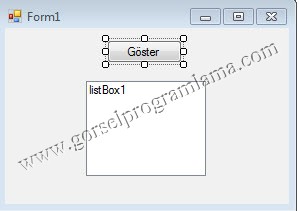
[code language=”csharp”]
using System;
using System.Collections.Generic;
using System.ComponentModel;
using System.Data;
using System.Drawing;
using System.Linq;
using System.Text;
using System.Windows.Forms;
using System.Collections;
namespace bit_array
{
public partial class Form1 : Form
{
public Form1()
{
InitializeComponent();
}//Daha fazla bilgi için : www.gorselprogramlama.com
bool[] a = { true, false, false, true, false, true };
private void goster_Click(object sender, EventArgs e)
{
BitArray aGiris = new BitArray(a);
foreach (bool i in aGiris)
{
listBox1.Items.Add(i);
}
}
}
}
[/code]

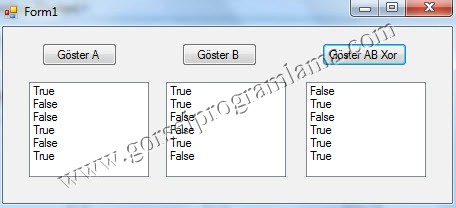
Örnek: Elektronik’ten anlayanlar bilir.Kapılar vardır.Ve kapısı veya kapısı gibi.İki tane giriş vardır (a,b).Bu girişlere bağlı olarak kapılar işlem yapar çıış olarak yansıtır.Mesela Or kapısı toplama,ve kapısı çarpma işlemi yapar tabiki ikilik sayı sisteminde.Aşağıdaki üç örnekte sırayla Or,And,Xor işlemleri yapılan örnek kodlar yazılmıştır.Eğer herhangi bir bitarray sınıfının değilini almak içinde Not özelliğini kullanıyoruz.
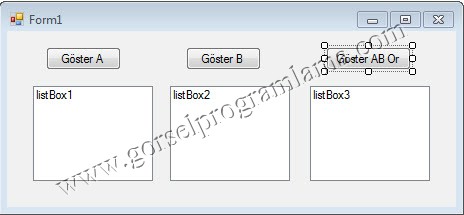
[code language=”csharp”]
using System;
using System.Collections.Generic;
using System.ComponentModel;
using System.Data;
using System.Drawing;
using System.Linq;
using System.Text;
using System.Windows.Forms;
using System.Collections;
namespace bit_array
{
public partial class Form1 : Form
{
public Form1()
{//Daha fazla bilgi için : www.gorselprogramlama.com
InitializeComponent();
}
bool [] a = { true, false, false, true, false, true };
bool[] b= { true, true, false, false, true, false };
bool[] c = new bool[6];
private void gosterA_Click(object sender, EventArgs e)
{
BitArray aGiris = new BitArray(a);
foreach (bool i in aGiris)
{
listBox1.Items.Add(i);
}
}
private void gosterB_Click(object sender, EventArgs e)
{
BitArray bGiris = new BitArray(b);
foreach (bool i in bGiris)
{
listBox2.Items.Add(i);
}
}
private void gosterA_B_Click(object sender, EventArgs e)
{
BitArray aGiris = new BitArray(a);
BitArray bGiris= new BitArray(b);
BitArray cikis= new BitArray(c);
cikis = aGiris.Or(bGiris);
foreach (bool i in cikis)
{
listBox3.Items.Add(i);
}
}
}
}
[/code]
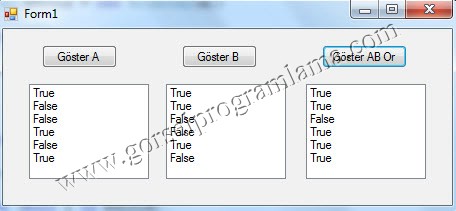
Örnek:
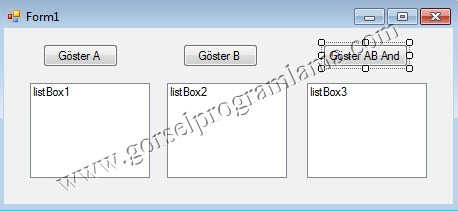
[code language=”csharp”]
using System;
using System.Collections.Generic;
using System.ComponentModel;
using System.Data;
using System.Drawing;
using System.Linq;
using System.Text;
using System.Windows.Forms;
using System.Collections;
namespace bit_array
{
public partial class Form1 : Form
{
public Form1()
{
InitializeComponent();
}
bool [] a = { true, false, false, true, false, true };
bool[] b= { true, true, false, false, true, false };
bool[] c = new bool[6];
private void gosterA_Click(object sender, EventArgs e)
{
BitArray aGiris = new BitArray(a);
foreach (bool i in aGiris)
{
listBox1.Items.Add(i);
}
}//Daha fazla bilgi için : www.gorselprogramlama.com
private void gosterB_Click(object sender, EventArgs e)
{
BitArray bGiris = new BitArray(b);
foreach (bool i in bGiris)
{
listBox2.Items.Add(i);
}
}
private void gosterA_B_Click(object sender, EventArgs e)
{
BitArray aGiris = new BitArray(a);
BitArray bGiris= new BitArray(b);
BitArray cikis= new BitArray(c);
cikis = aGiris.And(bGiris);
foreach (bool i in cikis)
{
listBox3.Items.Add(i);
}
}
}
}
[/code]

Örnek:

[code language=”csharp”]
using System;
using System.Collections.Generic;
using System.ComponentModel;
using System.Data;
using System.Drawing;
using System.Linq;
using System.Text;
using System.Windows.Forms;
using System.Collections;
namespace bit_array
{
public partial class Form1 : Form
{
public Form1()
{
InitializeComponent();
}
bool [] a = { true, false, false, true, false, true };
bool[] b= { true, true, false, false, true, false };
bool[] c = new bool[6];
private void gosterA_Click(object sender, EventArgs e)
{//Daha fazla bilgi için : www.gorselprogramlama.com
BitArray aGiris = new BitArray(a);
foreach (bool i in aGiris)
{
listBox1.Items.Add(i);
}
}
private void gosterB_Click(object sender, EventArgs e)
{
BitArray bGiris = new BitArray(b);
foreach (bool i in bGiris)
{
listBox2.Items.Add(i);
}
}
private void gosterA_B_Click(object sender, EventArgs e)
{
BitArray aGiris = new BitArray(a);
BitArray bGiris= new BitArray(b);
BitArray cikis= new BitArray(c);
cikis = aGiris.Xor(bGiris);
foreach (bool i in cikis)
{
listBox3.Items.Add(i);
}
}
}
}
[/code]
Daha fazla bilgi için : www.gorselprogramlama.com
konuyla alakası yok ama , benim bir sorum olcak .iki boyutlu [4,4] dizi tanımlancak . sonra. for döngüsü kullanarak .0-15 arası sayıları listbox da gösterilicek.. yardım edermisiniz
0-15 arası sayıları 2 boyutlu (4,4) diziye atan ve listbox’ta gösteren örnek yayınlandı link : http://www.gorselprogramlama.com/2-boyutlu-44-diziye-0-15-arasi-sayilari-ekle-c-net