Hashtable Sınıfı (koleksiyonu) C# Ders 50
Daha fazla bilgi için : www.gorselprogramlama.com
Hashtable Sınıfı : Veriler key-value(anahtar-değer) şeklinde tutulmaktadır.Veri türü object yani tüm veri türlerini kullanabilirsiniz.Key değiştirilemez ve boş değer içeremez ama value değiştirilebilir ve boş değer içerebilir.Bu sınıfı kullabilmek için using System.Collections kod satırını eklemeniz gerekir.
Add metodu: Key ve value elemanlarını ekleme işlemi için kullanılır.
Kullanımı : Add(key,value)
Örnek:
[code language=”csharp”]
Hashtable htablo = new Hashtable();
htablo.Add("01","adana");
[/code]
ContainsKey metodu: Belirtilen key değeri tanımlanan Hashtable sınıfı içinde var ise true yok ise false değerini döndürür.
Kullanımı : ContainsKey(key)
Örnek:
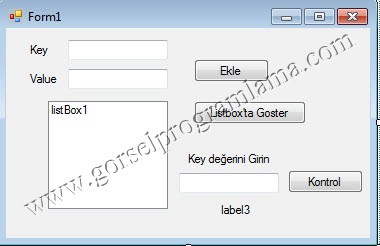
[code language=”csharp”]
using System;
using System.Collections.Generic;
using System.ComponentModel;
using System.Data;
using System.Drawing;
using System.Linq;
using System.Text;
using System.Windows.Forms;
using System.Collections;
namespace hashtable_sinifi
{
public partial class Form1 : Form
{
public Form1()
{ //Daha fazla bilgi için : www.gorselprogramlama.com
InitializeComponent();
}
Hashtable htablo = new Hashtable();
private void ekle_Click(object sender, EventArgs e)
{
htablo.Add(textBox1.Text,textBox2.Text);
}
private void listboxGoster_Click(object sender, EventArgs e)
{
listBox1.Items.Clear();
foreach (DictionaryEntry i in htablo)
{
listBox1.Items.Add("Key: " +i.Key+" value: " +i.Value);
}
}
private void kontrol_Click(object sender, EventArgs e)
{
label3.Text = htablo.ContainsKey(textBox3.Text).ToString();
}
}
}
[/code]
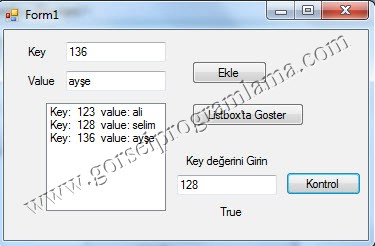
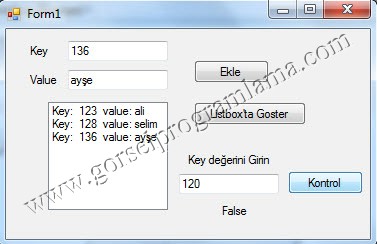
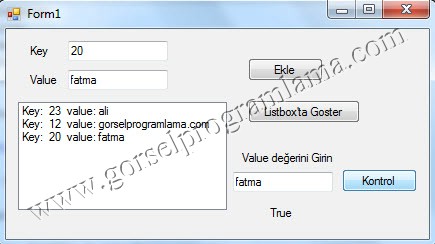
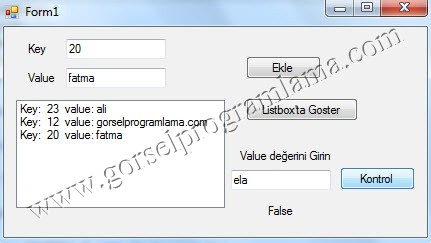
ContainsValue metodu: Belirtilen value değeri tanımlanan Hashtable sınıfı içinde var ise true yok ise false değerini döndürür.
Kullanımı : ContainsKey(value)
Örnek:
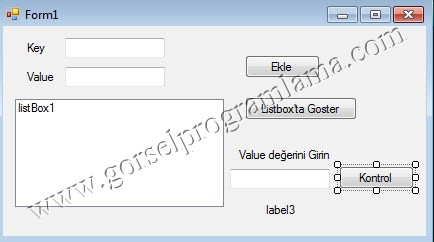
[code language=”csharp”]
using System;
using System.Collections.Generic;
using System.ComponentModel;
using System.Data;
using System.Drawing;
using System.Linq;
using System.Text;
using System.Windows.Forms;
using System.Collections;
namespace hashtable_sinifi
{
public partial class Form1 : Form
{
public Form1()
{
InitializeComponent();
}
Hashtable htablo = new Hashtable();
private void ekle_Click(object sender, EventArgs e)
{
htablo.Add(textBox1.Text,textBox2.Text);
}
private void listboxGoster_Click(object sender, EventArgs e)
{
listBox1.Items.Clear();
foreach (DictionaryEntry i in htablo)
{
listBox1.Items.Add("Key: " +i.Key+" value: " +i.Value);
}
} //Daha fazla bilgi için : www.gorselprogramlama.com
private void kontrol_Click(object sender, EventArgs e)
{
label3.Text = htablo.ContainsValue(textBox3.Text).ToString();
}
}
}
[/code]
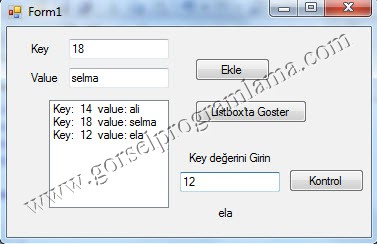
Not : anahtarı (key) belirtilen bir elemanın değerini (value) çağırmak için htablo[key] komutu kullanılır.Örnek ile daha iyi anlaşılacaktır.
Örnek:
[code language=”csharp”]
using System;
using System.Collections.Generic;
using System.ComponentModel;
using System.Data;
using System.Drawing;
using System.Linq;
using System.Text;
using System.Windows.Forms;
using System.Collections;
namespace hashtable_sinifi
{
public partial class Form1 : Form
{
public Form1()
{
InitializeComponent();
}
Hashtable htablo = new Hashtable();
private void ekle_Click(object sender, EventArgs e)
{
htablo.Add(textBox1.Text,textBox2.Text);
} //Daha fazla bilgi için : www.gorselprogramlama.com
private void listboxGoster_Click(object sender, EventArgs e)
{
listBox1.Items.Clear();
foreach (DictionaryEntry i in htablo)
{
listBox1.Items.Add("Key: " +i.Key+" value: " +i.Value);
}
}
private void kontrol_Click(object sender, EventArgs e)
{
label3.Text = htablo[textBox3.Text].ToString();
}
}
}
[/code]
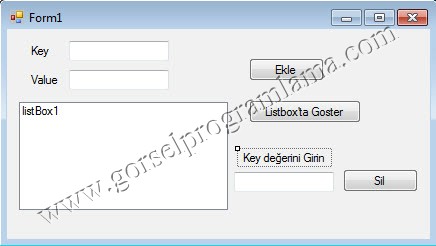
Remove metodu: Belirtilen key değerli elemanı silmek için kullanılır.
Kullanımı : Remove(key)
Örnek:
[code language=”csharp”]
using System;
using System.Collections.Generic;
using System.ComponentModel;
using System.Data;
using System.Drawing;
using System.Linq;
using System.Text;
using System.Windows.Forms;
using System.Collections;
namespace hashtable_sinifi
{
public partial class Form1 : Form
{
public Form1()
{ //Daha fazla bilgi için : www.gorselprogramlama.com
InitializeComponent();
}
Hashtable htablo = new Hashtable();
private void ekle_Click(object sender, EventArgs e)
{
htablo.Add(textBox1.Text,textBox2.Text);
}
private void listboxGoster_Click(object sender, EventArgs e)
{
listBox1.Items.Clear();
foreach (DictionaryEntry i in htablo)
{
listBox1.Items.Add("Key: " +i.Key+" value: " +i.Value);
}
}
private void sil_Click(object sender, EventArgs e)
{ htablo.Remove(textBox3.Text);
}
}
}
[/code]

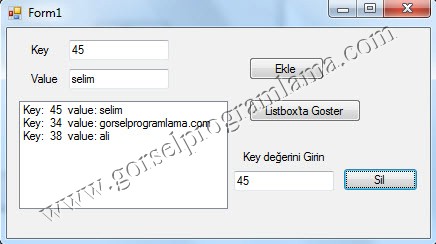
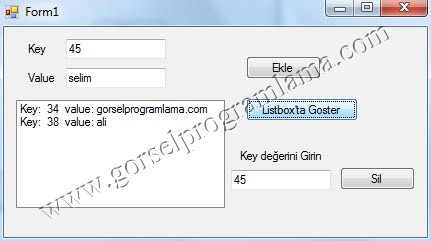
sil’e tıklandığında key değeri girilen eleman silinir.
Clear Özelliği: Belirtilen Hashtable sınıfını temizler.
Örnek : htable.Clear();
Count Özelliği: Belistilen Hashtable sınıfının eleman sayısını verir.
Örnek: label1.Text=htable.Count.ToString();
Daha fazla bilgi için : www.gorselprogramlama.com
emekleriniz için teşekkürler güzel bi program olmuş işime yarıyacaktır elbet bir gün Allah sizi bizim gibi programcıların başından eksik etmesin..
Allahım sizi “ben programcı değilim ama”, benim gibi yeni öğrencilerin başından eksik etmesin.
Hocam ellerine sağlık çok güzel anlatmışsın.