Formumuza 1 listbox, 1 textbox ve 5 button ekliyoruz formumuzun genel görünümü aşağıda ki gibi olacaktır.
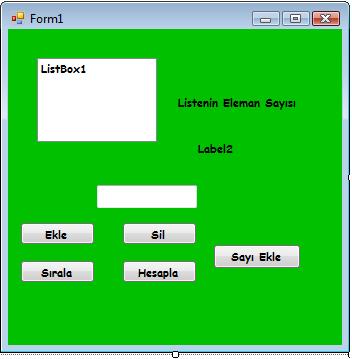
button 1, button2, button 3, button4, button 5 bu butonlara aşağıdaki kodları yazıyoruz.
*Form 1 kısmına aşagıdaki kodu yazıyoruz
[code language=”vb”]ListBox1.Items.Remove(ListBox1.Text)[/code]
*Button 1 kısmına aşağıdaki kodu yazıyoruz
[code language=”vb”]ListBox1.Items.Remove(ListBox1.Text)[/code]
*Button 2 kısmına aşagıdaki kodları yazıyoruz
[code language=”vb”]ListBox1.Items.Add(TextBox1.Text)[/code]
*Button 3 kısmına aşağıdaki kodları yazıyoruz
[code language=”vb”]Label2.Text = ListBox1.Items.Count.ToString()[/code]
*Button 4 kısmına aşağıdaki kodları yazıyoruz
[code language=”vb”]Dim i, j As Integer
For i = 0 To ListBox1.Items.Count – 1
For j = 0 To ListBox1.Items.Count – 1
If Val(ListBox1.Items.Item(j)) > Val(ListBox1.Items(i)) Then
k = ListBox1.Items.Item(i)
ListBox1.Items.Item(i) = ListBox1.Items.Item(j)
ListBox1.Items.Item(j) = k
End If
Next
Next
[/code]
*Button 5 kısmına aşağıdaki kodları yazıyoruz
[code language=”vb”] Dim a As Integer
For a = 1 To 20
Randomize()
ListBox1.Items.Add(Int(Rnd() * 100))
Next[/code]