Market Ürün ve Veresiye Kayıt İşlemi C#

FORM1 İçerisine Yazılacak Kodlar…
[code language=”CSharp”]
using System;
using System.Collections.Generic;
using System.ComponentModel;
using System.Data;
using System.Drawing;
using System.Linq;
using System.Text;
using System.Windows.Forms;
using System.Data.OleDb;
namespace WindowsFormsApplication1
{
public partial class Form1 : Form
{
public Form2 frm2;
public Form3 frm3;
string ara;
public Form1()
{
InitializeComponent();
frm2 = new Form2();
frm2.frm1 = this;
frm3 = new Form3();
frm3.frm1 = this;
}
public OleDbConnection bag = new OleDbConnection("Provider=Microsoft.Jet.OleDb.4.0; Data Source=data.mdb");
public OleDbCommand kmt = new OleDbCommand();
public OleDbDataAdapter adtr = new OleDbDataAdapter();
public DataSet dset = new DataSet();
public void listele()
{
bag.Open();
OleDbDataAdapter adtr = new OleDbDataAdapter("Select * From ur_bil", bag);
adtr.Fill(dset, "ur_bil");
dataGridView1.DataSource = dset.Tables["ur_bil"];
adtr.Dispose();
bag.Close();
}
public void listele1()
{
bag.Open();
OleDbDataAdapter adtr = new OleDbDataAdapter("Select * From musbil", bag);
adtr.Fill(dset, "musbil");
dataGridView2.DataSource = dset.Tables["musbil"];
adtr.Dispose();
bag.Close();
}
public void combo()
{
bag.Open();
kmt.Connection = bag;
kmt.CommandText = "Select * from urun_kategorisi";
OleDbDataReader oku;
oku = kmt.ExecuteReader();
while (oku.Read())
{
frm2.comboBox1.Items.Add(oku[0].ToString());
}
bag.Close();
oku.Dispose();
frm2.comboBox1.Sorted = true;
}
public void combo3()
{
bag.Open();
kmt.Connection = bag;
kmt.CommandText = "Select * from urunmarka";
OleDbDataReader oku;
oku = kmt.ExecuteReader();
while (oku.Read())
{
frm2.comboBox2.Items.Add(oku[0].ToString());
}
bag.Close();
oku.Dispose();
frm2.comboBox2.Sorted = true;
}
public void stok()
{
bag.Open();
kmt.Connection = bag;
kmt.CommandText = "Select * from stok_sayısı";
OleDbDataReader oku;
oku = kmt.ExecuteReader();
while (oku.Read())
{
frm2.comboBox3.Items.Add(oku[0].ToString());
}
bag.Close();
oku.Dispose();
frm2.comboBox3.Sorted = true;
}
public void urara()
{
OleDbDataAdapter adtr = new OleDbDataAdapter("select * From ur_bil", bag);
if (textBox1.Text == "")
{
kmt.Connection = bag;
kmt.CommandText = "Select * from ur_bil";
adtr.SelectCommand = kmt;
adtr.Fill(dset, "ur_bil");
}
if (Convert.ToBoolean(bag.State) == false)
{
bag.Open();
}
adtr.SelectCommand.CommandText = " Select * From ur_bil" +
" where(Barkot_num like ‘%" + textBox1.Text + "%’ )";
dset.Clear();
adtr.Fill(dset, "ur_bil");
bag.Close();
}
public void musara()
{
OleDbDataAdapter adtr = new OleDbDataAdapter("select * From musbil", bag);
if (textBox2.Text == "")
{
kmt.Connection = bag;
kmt.CommandText = "Select * from musbil";
adtr.SelectCommand = kmt;
adtr.Fill(dset, "musbil");
}
if (Convert.ToBoolean(bag.State) == false)
{
bag.Open();
}
adtr.SelectCommand.CommandText = " Select * From musbil" +
" where(TcKimlik like ‘%" + textBox2.Text + "%’ )";
dset.Clear();
adtr.Fill(dset, "musbil");
bag.Close();
listele();
}
private void Form1_Load(object sender, EventArgs e)
{
listele();
listele1();
}
private void button1_Click(object sender, EventArgs e)
{
frm2.ShowDialog();
}
private void button4_Click(object sender, EventArgs e)
{
try
{
foreach (DataGridViewCell hucre in dataGridView1.SelectedCells)
{
ara = hucre.Value.ToString();
}
DialogResult cevap;
cevap = MessageBox.Show("Kaydı silmek istediğinizden eminmisiniz", "Uyarı", MessageBoxButtons.YesNo, MessageBoxIcon.Question);
if (cevap == DialogResult.Yes)
{
bag.Open();
kmt.Connection = bag;
kmt.CommandText = "DELETE from ur_bil WHERE Barkot_num=’" + ara + "’";
kmt.ExecuteNonQuery();
kmt.Dispose();
bag.Close();
dset.Clear();
listele();
listele1();
}
}
catch
{ ;}
}
private void button5_Click(object sender, EventArgs e)
{
frm3.ShowDialog();
}
private void button3_Click(object sender, EventArgs e)
{
urara();
}
private void button6_Click(object sender, EventArgs e)
{
try
{
foreach (DataGridViewCell hucre in dataGridView2.SelectedCells)
{
ara = hucre.Value.ToString();
}
DialogResult cevap;
cevap = MessageBox.Show("Kaydı silmek istediğinizden eminmisiniz", "Uyarı", MessageBoxButtons.YesNo, MessageBoxIcon.Question);
if (cevap == DialogResult.Yes)
{
bag.Open();
kmt.Connection = bag;
kmt.CommandText = "DELETE from musbil WHERE TcKimlik=’" + ara + "’";
kmt.ExecuteNonQuery();
kmt.Dispose();
bag.Close();
dset.Clear();
listele1();
listele();
}
}
catch
{ ;}
}
private void button7_Click(object sender, EventArgs e)
{
musara();
}
private void button2_Click(object sender, EventArgs e)
{
Close();
}
}
}
[/code]
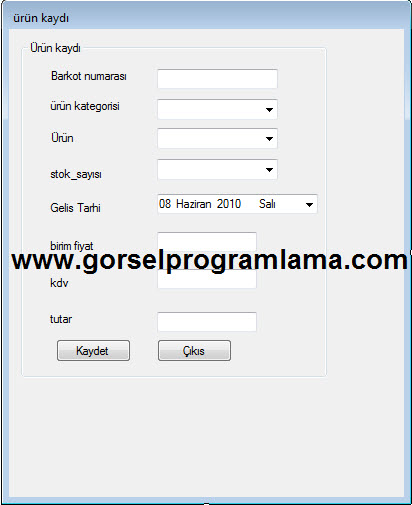
FORM1 İçerisine Yazılacak Kodlar…
[code language=”CSharp”]
using System;
using System.Collections.Generic;
using System.ComponentModel;
using System.Data;
using System.Drawing;
using System.Linq;
using System.Text;
using System.Windows.Forms;
namespace WindowsFormsApplication1
{
public partial class Form2 : Form
{
public Form1 frm1;
public Form2()
{
InitializeComponent();
}
private void Form2_Load(object sender, EventArgs e)
{
frm1.combo();
frm1.combo3();
frm1.stok();
}
private void button1_Click(object sender, EventArgs e)
{
if (comboBox1.Text != "" && textBox2.Text != "")
{
double bfiyat, kdv, tutar;
bfiyat = double.Parse(textBox3.Text);
kdv = double.Parse(textBox4.Text);
tutar = bfiyat + (bfiyat * (kdv / 100));
textBox5.Text = tutar.ToString();
frm1.bag.Open();
frm1.kmt.Connection = frm1.bag;
frm1.kmt.CommandText = "INSERT INTO ur_bil(Barkot_num,urun_kategorisi,urunler,stok_sayisi,Gelis_tarihi,Fiyat,Kdv,tutar) VALUES (‘" + textBox2.Text + "’,’" + comboBox1.Text + "’,’" + comboBox2.Text + "’,’" + comboBox3.Text + "’,’" + dateTimePicker1.Text + "’,’" + textBox3.Text + "’,’" + textBox4.Text + "’,’" + textBox5.Text + "’) ";
frm1.kmt.ExecuteNonQuery();
frm1.kmt.Dispose();
frm1.bag.Close();
textBox2.Text = "0"; textBox3.Text = "0"; textBox4.Text = "0";
textBox5.Text = "0";
comboBox1.Text = ""; comboBox2.Text = ""; comboBox3.Text = "";
frm1.dset.Clear();
frm1.listele();
frm1.listele1();
MessageBox.Show("Kayıt İşlemi Tamamlandı");
}
else
{
MessageBox.Show("Lütfen Boş Yerleri Doldurunuz ");
}
}
private void button4_Click(object sender, EventArgs e)
{
Close();
}
}
}
[/code]

FORM1 İçerisine Yazılacak Kodlar…
[code language=”CSharp”]
using System;
using System.Collections.Generic;
using System.ComponentModel;
using System.Data;
using System.Drawing;
using System.Linq;
using System.Text;
using System.Windows.Forms;
namespace WindowsFormsApplication1
{
public partial class Form3 : Form
{
public Form1 frm1;
public Form3()
{
InitializeComponent();
}
private void Form3_Load(object sender, EventArgs e)
{
frm1.listele1();
}
private void button1_Click(object sender, EventArgs e)
{
if (textBox1.Text != "")
{
frm1.bag.Open();
frm1.kmt.Connection = frm1.bag;
frm1.kmt.CommandText = "INSERT INTO musbil(TcKimlik,ad,soyad,borc) VALUES (‘" + textBox1.Text + "’,’" + textBox2.Text + "’,’" + textBox3.Text + "’,’" + textBox4.Text + "’) ";
frm1.kmt.ExecuteNonQuery();
frm1.kmt.Dispose();
frm1.bag.Close();
textBox1.Text = "0"; textBox2.Text = "0"; textBox3.Text = "0";
textBox4.Text = "0";
frm1.dset.Clear();
frm1.listele1();
frm1.listele();
MessageBox.Show("Kayıt İşlemi Tamamlanmıştır");
}
else
{
MessageBox.Show("Lütfen Boş Alanları Doldurunuz");
}
}
private void button2_Click(object sender, EventArgs e)
{
Close();
}
}
}
[/code]
tesekkurler
Rica ederim…
Destek için sitedeki reklamları tıklayabilirsiniz .
s.a
bnde bu program hata veriyor hatada frm1.bag.Open();
da hata veriyor
husame: access 2003 kurmalısın veya jet yerine ace,4.0 yerine 12.0 ve veri tabanı ismi data.accdb olmalı.Tabi veri tabanına 2007 de açıp 2007 olarak kaydetmelisin.
hocam bende acces 2010 kurulu oldugu halde ve dediğiniz gibi jet yerini falan onları ayarladım ama program açılmıyor nedense daha doğrusu açılıyor ama işlem yapılmıyor
Rahmivan:
Hata mesajı olarak ne yazıyor.