Mini Hesap Makinesi ve Numara Düzenleyici …
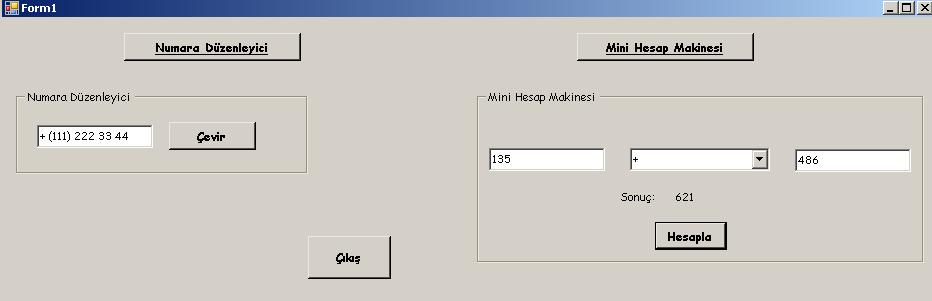
[code language=”csharp”]
public partial class Form1 : Form
{
// Mini Hesap Makinemiz İçin Formumuzun üzerine önce 2 Textbox 1 combobox 2 label 1 adet de button ekiyoruz.
//Numara Düzenleyici İçin Formumuzun üzerine 1 Textbox ve 1 Button ekliyoruz.
public Form1()
{
InitializeComponent();
}
private void Form1_Load(object sender, EventArgs e)
{
groupBox1.Visible = false;
groupBox2.Visible = false;
comboBox1.Items.Add("+");
comboBox1.Items.Add("-");
comboBox1.Items.Add("*");
comboBox1.Items.Add("/");
//Bu şekilde +-*/ parametrelerimizi comboboxumuza eklemiş oluyoruz.
}
private void button1_Click(object sender, EventArgs e)
{
groupBox1.Visible = true;
}
private void button2_Click(object sender, EventArgs e)
{
groupBox2.Visible = true;
}
private void button3_Click(object sender, EventArgs e)
{
long x;
x = Convert.ToInt64(textBox1.Text);
textBox1.Text = x.ToString("+## (###) ### ## ##");
// Bu program sayesinde girilen numaralarımızı kodlamış oluyoruz.
}
private void button4_Click(object sender, EventArgs e)
{
double sayi1, sayi2, topla;
//ilk önce 3 tane değişken tanıtıyoruz işlem yaptırmak için
sayi1 = Convert.ToDouble(textBox2.Text);
//Textboxları değişkenlere atıyoruz.
sayi2 = Convert.ToDouble(textBox3.Text);
//Textboxları değişkenlere atıyoruz.
switch (comboBox1.Text)
//switch döngüsü kullanarak combobox’un içinde işlem yaptırıyoruz
{
case "+":
topla = sayi1 + sayi2;
label1.Text = topla.ToString();
break;
case "-":
topla = sayi1 – sayi2;
label1.Text = topla.ToString();
break;
case "*":
topla = sayi1 * sayi2;
label1.Text = topla.ToString();
break;
case "/":
topla = sayi1 / sayi2;
label1.Text = topla.ToString();
break;
}
}
private void button5_Click(object sender, EventArgs e)
{
Close();
}
}
} [/code]