Muhtarlık Takip Programı C#.NET(CNET)…
Bu ve benzeri takip programlar veya bu programa artı özellikler ekletmek istiyorsanız gorselprogram@gmail.com adresine mail atın.

FORM1 İçerisine Yazılacak Kodlar…
[code language=”CSharp”]
using System;
using System.Collections.Generic;
using System.ComponentModel;
using System.Data;
using System.Data.OleDb;
using System.Drawing;
using System.Linq;
using System.Text;
using System.Windows.Forms;
namespace WindowsFormsApplication4
{
public partial class Form1 : Form
{
public Form2 frm2;
public Form3 frm3;
public Form1()
{
InitializeComponent();
frm2 = new Form2();
frm3 = new Form3();
frm2.frm1 = this;
frm3.frm1 = this;
}
public OleDbConnection baq = new OleDbConnection("Provider=Microsoft.Jet.OleDb.4.0; Data Source=data.mdb");
public OleDbCommand kmt = new OleDbCommand();
public OleDbDataAdapter adtr = new OleDbDataAdapter();
public DataSet dset = new DataSet();
public void listele()
{
baq.Open();
OleDbDataAdapter adtr = new OleDbDataAdapter("Select * From sahisbil", baq);
adtr.Fill(dset, "sahisbil");
dataGridView1.DataSource = dset.Tables["sahisbil"];
adtr.Dispose();
baq.Close();
}
public void listele1()
{
baq.Open();
OleDbDataAdapter adtr = new OleDbDataAdapter("Select * From nufusbil", baq);
adtr.Fill(dset, "nufusbil");
dataGridView2.DataSource = dset.Tables["nufusbil"];
adtr.Dispose();
baq.Close();
}
private void button4_Click(object sender, EventArgs e)
{
Application.Exit();
}
private void Form1_Load(object sender, EventArgs e)
{
listele();
listele1();
}
private void button1_Click(object sender, EventArgs e)
{
frm2.Show();
this.Hide();
}
public string düzenle;
public string dznle;
public int str = 0;
private void button3_Click(object sender, EventArgs e)
{
for (str = 0; str <= dataGridView1.Rows.Count; str++)
{
if (dataGridView1.Rows[str].Cells[0].Selected == true || dataGridView1.Rows[str].Cells[1].Selected == true || dataGridView1.Rows[str].Cells[2].Selected == true || dataGridView1.Rows[str].Cells[3].Selected == true || dataGridView1.Rows[str].Cells[4].Selected == true || dataGridView1.Rows[str].Cells[5].Selected == true || dataGridView1.Rows[str].Cells[6].Selected == true || dataGridView1.Rows[str].Cells[7].Selected == true || dataGridView1.Rows[str].Cells[8].Selected == true || dataGridView1.Rows[str].Cells[9].Selected == true || dataGridView1.Rows[str].Cells[10].Selected == true || dataGridView1.Rows[str].Cells[11].Selected == true || dataGridView1.Rows[str].Cells[12].Selected == true || dataGridView1.Rows[str].Cells[13].Selected == true || dataGridView1.Rows[str].Cells[14].Selected == true || dataGridView1.Rows[str].Cells[15].Selected == true || dataGridView1.Rows[str].Cells[16].Selected == true)
{
break;
}
if (dataGridView2.Rows[str].Cells[0].Selected == true || dataGridView2.Rows[str].Cells[1].Selected == true || dataGridView2.Rows[str].Cells[2].Selected == true || dataGridView2.Rows[str].Cells[3].Selected == true || dataGridView1.Rows[str].Cells[4].Selected == true || dataGridView2.Rows[str].Cells[5].Selected == true || dataGridView2.Rows[str].Cells[6].Selected == true || dataGridView2.Rows[str].Cells[7].Selected == true || dataGridView2.Rows[str].Cells[8].Selected == true || dataGridView2.Rows[str].Cells[9].Selected == true || dataGridView2.Rows[str].Cells[10].Selected == true || dataGridView2.Rows[str].Cells[11].Selected == true || dataGridView2.Rows[str].Cells[12].Selected == true || dataGridView2.Rows[str].Cells[13].Selected == true || dataGridView2.Rows[str].Cells[14].Selected == true || dataGridView2.Rows[str].Cells[15].Selected == true || dataGridView2.Rows[str].Cells[16].Selected == true)
{
break;
}
}
düzenle = dataGridView1.Rows[str].Cells[5].Value.ToString();
dznle = dataGridView1.Rows[str].Cells[0].Value.ToString();
frm3.Show();
this.Hide();
}
private void button2_Click(object sender, EventArgs e)
{
string silinecek,silincek;
try
{
int row = 0;
for (row = 0; row <= dataGridView1.Rows.Count; row++)
{
if (dataGridView1.Rows[row].Cells[0].Selected == true || dataGridView1.Rows[row].Cells[1].Selected == true || dataGridView1.Rows[row].Cells[2].Selected == true || dataGridView1.Rows[row].Cells[3].Selected == true || dataGridView1.Rows[row].Cells[4].Selected == true || dataGridView1.Rows[row].Cells[5].Selected == true || dataGridView1.Rows[row].Cells[6].Selected == true || dataGridView1.Rows[row].Cells[7].Selected == true || dataGridView1.Rows[row].Cells[8].Selected == true || dataGridView1.Rows[row].Cells[9].Selected == true || dataGridView1.Rows[row].Cells[10].Selected == true || dataGridView1.Rows[row].Cells[11].Selected == true || dataGridView1.Rows[row].Cells[12].Selected == true || dataGridView1.Rows[row].Cells[13].Selected == true || dataGridView1.Rows[row].Cells[14].Selected == true || dataGridView1.Rows[row].Cells[15].Selected == true || dataGridView1.Rows[row].Cells[16].Selected == true)
{
break;
}
if (dataGridView2.Rows[row].Cells[0].Selected == true || dataGridView2.Rows[row].Cells[1].Selected == true || dataGridView2.Rows[row].Cells[2].Selected == true || dataGridView2.Rows[row].Cells[3].Selected == true || dataGridView2.Rows[row].Cells[4].Selected == true || dataGridView2.Rows[row].Cells[5].Selected == true || dataGridView2.Rows[row].Cells[6].Selected == true || dataGridView2.Rows[row].Cells[7].Selected == true || dataGridView2.Rows[row].Cells[8].Selected == true || dataGridView2.Rows[row].Cells[9].Selected == true || dataGridView2.Rows[row].Cells[10].Selected == true || dataGridView2.Rows[row].Cells[11].Selected == true || dataGridView2.Rows[row].Cells[12].Selected == true || dataGridView2.Rows[row].Cells[13].Selected == true || dataGridView2.Rows[row].Cells[14].Selected == true)
{
break;
}
}
silinecek = dataGridView1.Rows[row].Cells[13].Value.ToString();
silincek = dataGridView2.Rows[row].Cells[0].Value.ToString();
DialogResult cevap;
cevap = MessageBox.Show("Kaydı silmek istediğinizden eminmisiniz", "Uyarı", MessageBoxButtons.YesNo, MessageBoxIcon.Question);
if (cevap == DialogResult.Yes)
{
baq.Open();
kmt.Connection = baq;
kmt.CommandText = "DELETE from sahisbil WHERE shs_no=’" + silincek + "’";
kmt.ExecuteNonQuery();
kmt.CommandText = "DELETE from nufusbil WHERE tc=’" + silinecek + "’";
kmt.ExecuteNonQuery();
kmt.Dispose();
dset.Clear();
baq.Close();
}
}
catch
{ ;}
}
private void textBox1_TextChanged(object sender, EventArgs e)
{
OleDbDataAdapter adtr = new OleDbDataAdapter("select * From sahisbil", baq);
if (textBox1.Text == "")
{
kmt.Connection = baq;
kmt.CommandText = "Select * from sahisbil";
adtr.SelectCommand = kmt;
adtr.Fill(dset , "sahisbil");
}
if (Convert.ToBoolean(baq.State) == false)
{
baq.Open();
}
adtr.SelectCommand.CommandText = " Select * From sahisbil" +
" where(ad like ‘%" + textBox1.Text + "%’ )";
dset.Tables["sahisbil"].Clear();
adtr.Fill(dset , "sahisbil");
baq.Close();
}
private void textBox2_TextChanged(object sender, EventArgs e)
{
OleDbDataAdapter adtr = new OleDbDataAdapter("select * From nufusbil", baq);
if (textBox2.Text == "")
{
kmt.Connection = baq;
kmt.CommandText = "Select * from nufusbil";
adtr.SelectCommand = kmt;
adtr.Fill(dset, "nufusbil");
}
if (Convert.ToBoolean(baq.State) == false)
{
baq.Open();
}
adtr.SelectCommand.CommandText = " Select * From nufusbil" +
" where(tc like ‘%" + textBox2.Text + "%’ )";
dset.Tables["nufusbil"].Clear();
adtr.Fill(dset, "nufusbil");
baq.Close();
}
private void textBox3_TextChanged(object sender, EventArgs e)
{
OleDbDataAdapter adtr = new OleDbDataAdapter("select * From sahisbil", baq);
if (textBox1.Text == "")
{
kmt.Connection = baq;
kmt.CommandText = "Select * from sahisbil";
adtr.SelectCommand = kmt;
adtr.Fill(dset, "sahisbil");
}
if (Convert.ToBoolean(baq.State) == false)
{
baq.Open();
}
adtr.SelectCommand.CommandText = " Select * From sahisbil" +
" where(sicil like ‘%" + textBox1.Text + "%’ )";
dset.Tables["sahisbil"].Clear();
adtr.Fill(dset, "sahisbil");
baq.Close();
}
private void button5_Click(object sender, EventArgs e)
{
Form4 frm4 = new Form4();
frm4.Show();
}
}
}
[/code]
Bu ve benzeri takip programlar veya bu programa artı özellikler ekletmek istiyorsanız gorselprogram@gmail.com adresine mail atın.

FORM1 İçerisine Yazılacak Kodlar…
[code language=”CSharp”]
using System;
using System.Collections.Generic;
using System.ComponentModel;
using System.Data;
using System.Drawing;
using System.Linq;
using System.Text;
using System.Windows.Forms;
namespace WindowsFormsApplication4
{
public partial class Form2 : Form
{
public Form1 frm1;
public Form2()
{
InitializeComponent();
}
private void button2_Click(object sender, EventArgs e)
{
if (textBox1.Text != "" &amp;amp;&amp;amp; textBox17.Text != "" &amp;amp;&amp;amp; comboBox3.Text != "")
{
frm1.baq.Open();
frm1.kmt.Connection = frm1.baq;
frm1.kmt.CommandText = "INSERT INTO sahisbil(ad,soyad,cins,uyruk,meslek,shs_no,nakil_gel,is_adres,adres,okul,cep,mail,o_soyad,sicil,vergi,nakil_tarihi,nakil_git) VALUES(‘" + textBox1.Text + "’,’" + textBox2.Text + "’,’" + comboBox1.Text + "’,’" + textBox3.Text + "’,’" + textBox4.Text + "’,’" + textBox5.Text + "’,’" + textBox6.Text + "’,’" + textBox12.Text + "’,’" + textBox7.Text + "’,’" + textBox8.Text + "’,’" + textBox9.Text + "’,’" + textBox10.Text + "’,’" + textBox11.Text + "’,’" + textBox13.Text + "’,’" + textBox14.Text + "’,’" + dateTimePicker1.Text + "’,’" + textBox16.Text + "’)";
frm1.kmt.ExecuteNonQuery();
frm1.kmt.CommandText = "INSERT INTO nufusbil(tc,baba,ana,d_yeri,d_tarihi,medeni,din,il,ilce,koy,cilt,ailesira,kan,durum,uyar) VALUES(‘" + textBox17.Text + "’,’" + textBox18.Text + "’,’" + textBox19.Text + "’,’" + textBox20.Text + "’,’" + dateTimePicker2.Text + "’,’" + comboBox2.Text + "’,’" + textBox15.Text + "’,’" + textBox21.Text + "’,’" + textBox22.Text + "’,’" + textBox23.Text + "’,’" + textBox24.Text + "’,’" + textBox25.Text + "’,’" + comboBox3.Text + "’,’" + comboBox4.Text + "’,’" + comboBox5.Text + "’)";
frm1.kmt.ExecuteNonQuery();
frm1.kmt.Dispose();
frm1.baq.Close();
comboBox1.Items.Clear();
comboBox2.Items.Clear();
comboBox3.Items.Clear();
comboBox4.Items.Clear();
comboBox5.Items.Clear();
frm1.dset.Tables["sahisbil"].Clear();
frm1.dset.Tables["nufusbil"].Clear();
frm1.listele();
frm1.listele1();
for (int i = 0; i < this.Controls.Count; i++)
{
if (this.Controls[i] is TextBox) this.Controls[i].Text = "";
if (this.Controls[i] is ComboBox ) this.Controls[i].Text = "";
}
MessageBox.Show("Kayıt işlemi tamamlandı ! ");
this.Hide();
frm1.Show();
}
else
{
MessageBox.Show("Boş alanları doldurunuz !!!");
}
}
private void button4_Click(object sender, EventArgs e)
{
frm1.Show();
this.Hide();
}
private void Form2_Load(object sender, EventArgs e)
{
}
private void button3_Click(object sender, EventArgs e)
{
this.Hide();
}
private void button1_Click(object sender, EventArgs e)
{
openFileDialog1.ShowDialog();
pictureBox1.ImageLocation = openFileDialog1.FileName;
pictureBox1.SizeMode = PictureBoxSizeMode.StretchImage;
}
}
}
[/code]
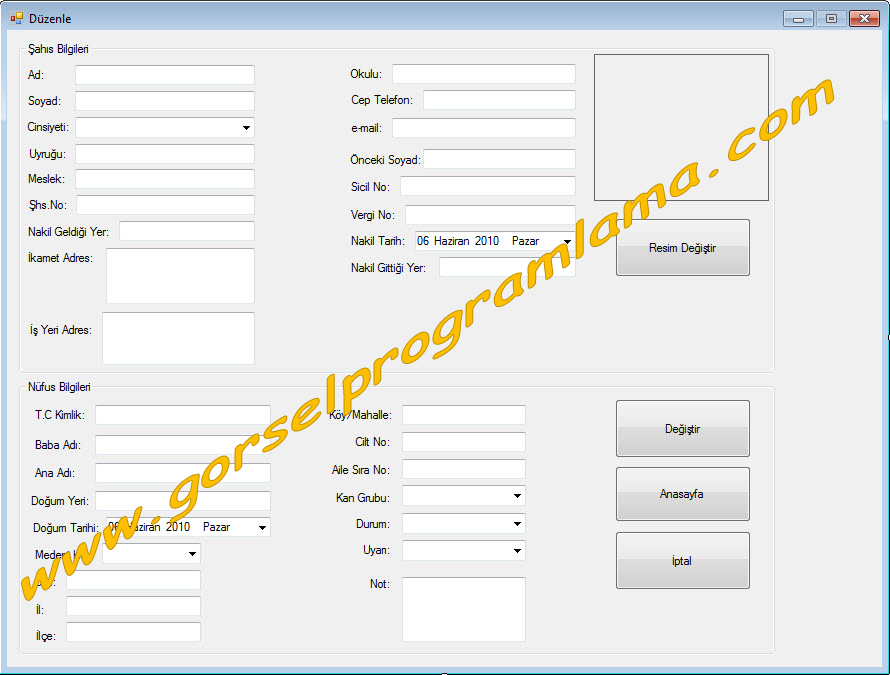
FORM1 İçerisine Yazılacak Kodlar…
[code language=”CSharp”]
using System;
using System.Collections.Generic;
using System.ComponentModel;
using System.Data;
using System.Drawing;
using System.Linq;
using System.Text;
using System.Windows.Forms;
namespace WindowsFormsApplication4
{
public partial class Form3 : Form
{
public Form1 frm1;
public Form3()
{
InitializeComponent();
}
private void Form3_Load(object sender, EventArgs e)
{
textBox1.Text = frm1.dataGridView1.Rows[frm1.str].Cells[0].Value.ToString();
textBox2.Text = frm1.dataGridView1.Rows[frm1.str].Cells[1].Value.ToString();
comboBox1.Text = frm1.dataGridView1.Rows[frm1.str].Cells[2].Value.ToString();
textBox3.Text = frm1.dataGridView1.Rows[frm1.str].Cells[3].Value.ToString();
textBox4.Text = frm1.dataGridView1.Rows[frm1.str].Cells[4].Value.ToString();
textBox5.Text = frm1.dataGridView1.Rows[frm1.str].Cells[5].Value.ToString();
textBox6.Text = frm1.dataGridView1.Rows[frm1.str].Cells[6].Value.ToString();
textBox7.Text = frm1.dataGridView1.Rows[frm1.str].Cells[10].Value.ToString();
textBox8.Text = frm1.dataGridView1.Rows[frm1.str].Cells[11].Value.ToString();
textBox9.Text = frm1.dataGridView1.Rows[frm1.str].Cells[12].Value.ToString();
textBox10.Text = frm1.dataGridView1.Rows[frm1.str].Cells[7].Value.ToString();
textBox11.Text = frm1.dataGridView1.Rows[frm1.str].Cells[8].Value.ToString();
textBox12.Text = frm1.dataGridView1.Rows[frm1.str].Cells[9].Value.ToString();
textBox13.Text = frm1.dataGridView1.Rows[frm1.str].Cells[13].Value.ToString();
textBox14.Text = frm1.dataGridView1.Rows[frm1.str].Cells[14].Value.ToString();
dateTimePicker2.Text = frm1.dataGridView1.Rows[frm1.str].Cells[15].Value.ToString();
textBox16.Text = frm1.dataGridView1.Rows[frm1.str].Cells[16].Value.ToString();
textBox17.Text = frm1.dataGridView2.Rows[frm1.str].Cells[0].Value.ToString();
textBox18.Text = frm1.dataGridView2.Rows[frm1.str].Cells[1].Value.ToString();
textBox19.Text = frm1.dataGridView2.Rows[frm1.str].Cells[2].Value.ToString();
dateTimePicker1.Text = frm1.dataGridView2.Rows[frm1.str].Cells[4].Value.ToString();
textBox20.Text = frm1.dataGridView2.Rows[frm1.str].Cells[3].Value.ToString();
comboBox2.Text = frm1.dataGridView2.Rows[frm1.str].Cells[5].Value.ToString();
textBox15.Text = frm1.dataGridView2.Rows[frm1.str].Cells[6].Value.ToString();
textBox21.Text = frm1.dataGridView2.Rows[frm1.str].Cells[7].Value.ToString();
textBox22.Text = frm1.dataGridView2.Rows[frm1.str].Cells[8].Value.ToString();
textBox23.Text = frm1.dataGridView2.Rows[frm1.str].Cells[9].Value.ToString();
textBox24.Text = frm1.dataGridView2.Rows[frm1.str].Cells[10].Value.ToString();
textBox25.Text = frm1.dataGridView2.Rows[frm1.str].Cells[11].Value.ToString();
comboBox3.Text = frm1.dataGridView2.Rows[frm1.str].Cells[12].Value.ToString();
comboBox4.Text = frm1.dataGridView2.Rows[frm1.str].Cells[13].Value.ToString();
comboBox5.Text = frm1.dataGridView2.Rows[frm1.str].Cells[14].Value.ToString();
}
private void button2_Click(object sender, EventArgs e)
{
try
{
frm1.baq.Open();
frm1.kmt.Connection = frm1.baq;
frm1.kmt.CommandText = "UPDATE sahisbil SET ad=’" + textBox1.Text + "’,soyad=’" + textBox2.Text + "’,cins=’" + comboBox1.Text + "’,uyruk=’" + textBox3.Text + "’,meslek=’" + textBox4.Text + "’,shs_no=’" + textBox5.Text + "’,nakil_gel=’" + textBox6.Text + "’,is_adres=’" + textBox12.Text + "’,adres=’" + textBox7.Text + "’,okul=’" + textBox8.Text + "’,cep=’" + textBox9.Text + "’,mail=’" + textBox10.Text + "’,o_soyad=’" + textBox11.Text + "’,sicil=’" + textBox13.Text + "’,vergi=’" + textBox14.Text + "’,nakil_tarihi=’" + dateTimePicker1.Text + "’,nakil_git=’" + textBox16.Text + "’ WHERE shs_no=’" + frm1.düzenle + "’";
frm1.kmt.ExecuteNonQuery();
frm1.dset.Tables["sahisbil"].Clear();
frm1.kmt.CommandText = "UPDATE nufusbil SET tc=’" + textBox17.Text + "’,baba=’" + textBox18.Text + "’,ana=’" + textBox19.Text + "’,d_yeri=’" + textBox20.Text + "’,d_tarihi=’" +dateTimePicker2.Text + "’,medeni=’" + comboBox2.Text + "’,din=’" + textBox15.Text + "’,il=’" + textBox21.Text + "’,ilce=’" + textBox22.Text + "’,koy=’" + textBox23.Text + "’,cilt=’" + textBox24.Text + "’,ailesira=’" + textBox25.Text + "’,kan=’" + comboBox3.Text + "’,durum=’" + comboBox4.Text + "’,uyar=’" + comboBox5.Text + "’ WHERE tc=’" + frm1.dznle + "’";
frm1.kmt.ExecuteNonQuery();
frm1.dset.Tables["nufusbil"].Clear();
frm1.kmt.Dispose();
frm1.baq.Close();
frm1.listele();
this.Hide();
frm1.Show();
}
catch
{
;
}
}
private void button4_Click(object sender, EventArgs e)
{
this.Hide();
frm1.Show();
}
private void button3_Click(object sender, EventArgs e)
{
this.Hide();
frm1.Show();
}
private void button1_Click(object sender, EventArgs e)
{
openFileDialog1.ShowDialog();
pictureBox1.ImageLocation = openFileDialog1.FileName;
pictureBox1.SizeMode = PictureBoxSizeMode.StretchImage;
}
}
}
[/code]
Bu ve benzeri takip programlar veya bu programa artı özellikler ekletmek istiyorsanız gorselprogram@gmail.com adresine mail atın.

FORM1 İçerisine Yazılacak Kodlar…
[code language=”CSharp”]
public partial class Form4 : Form
{
public Form4()
{
InitializeComponent();
}
private void button1_Click(object sender, EventArgs e)
{
this.Hide();
}
}
[/code]
Bu ve benzeri takip programlar veya bu programa artı özellikler ekletmek istiyorsanız gorselprogram@gmail.com adresine mail atın.
Sayin admin 2 sorum olacakdi.
visuaL studio 05 icin dataview ve datagrid fonksiyonlari yok yada ben acamıyorum bu fonksiyonlari nasıl acarım yada sadece bu fonksiyon olan bi proje paylasırmısnız tesekkur ederim iyi gunler
Toolbox üzerinde sağ tık.Ekrana gelen Choose Items .Ekrana gelen menüden datagrid ve dataview yanındaki checkleri işaretledikten sonra ok’liyoruz.
Destek için sitedeki reklamları tıklayabilirsiniz .
merhaba iyi günler hocam simdi bu programda 3 kısı kaydetin diyelim 1 tıklıyosun acıyor ama 2 ve ya 3 tıkladıgında yani kisiler yine 1 kısı gosteriyo neden acaba 20 kıs kaydediyosunuz ama her baska kısı tıkladıgımızda 1 kıs gosteriyo
ben kaydedemiyorum neden
neyi kaydedemiyorsun.
BEN VISUAL STIDIO 2005 KULANIYORUM BU PROJEYI ACMIYOR ACABA BU HANDI SURUM VİSUAL STİDUO 2008 MI BI YARDIMCI OLURSANIZ SEVINIRIM IYI GUNLER …!
2008’de yapıldığı için 2005 te açılmaz.
ya ben arama yap dediğimde nie bütün kayıtlarımı gösteriyor acaba yardımcı olabilir misin?
bu silme butonunun kodlarını bulamadım yardımcı olurmusunuz
delete ile başlayan sql kodlarının bulunduğu yer.Ayrıca yukarıdaki projeyi İNDİR linkinden indirip inceleyebilirsin.
where şart bloğunu yazmamış olabilirsin.
Kolay Gelsin Arkadaşlar Muhtar Takip programını vb.net İçin varmı?
Kolay Gelsin Arkadaşlar Muhtar Takip programı vb.net İçin varmı?
Aynen vb.net için yapabilirmisiniz.
Arkadaslar gerçekten Vb Muhtar programına cok ihtiyacım var yardımcı olurmusunuz.
acaba bu programa başka ne ekleyebilirim?
Arkadaslar ogretmen odev verdı muhtar takını vb de yapabılırmısınız.
proje isteklerinizi ve eklentileri gorselprogram@gmail.com adresine mail atınız.
proje isteklerinizi ve eklentileri gorselprogram@gmail.com adresine mail atınızzz.
proje isteklerinizi ve eklentileri gorselprogram@gmail.com adresine mail atınızz.
proje isteklerinizi ve eklentileri gorselprogram@gmail.com adresine mail atınızzzz.
merhabalar kullanıcı adı ve şifre ekleyebilirmisiniz ?
bende parola istiyor acaba ne parolası
teskkrler
Kardesim Bunu okula goturucem odevım varda senın yazdıgın datagrıdlerdekı sahıs bılgılerı sılınıyo nufus bılgılerın sılınmıyo bı yardım etsen.