Öğrenci Bilgileri DataSet’li Örnek C#
oLeDbDataAdapter Oluşturma (Resimli Anlatım)
======= Veritabanı Bağlama ========
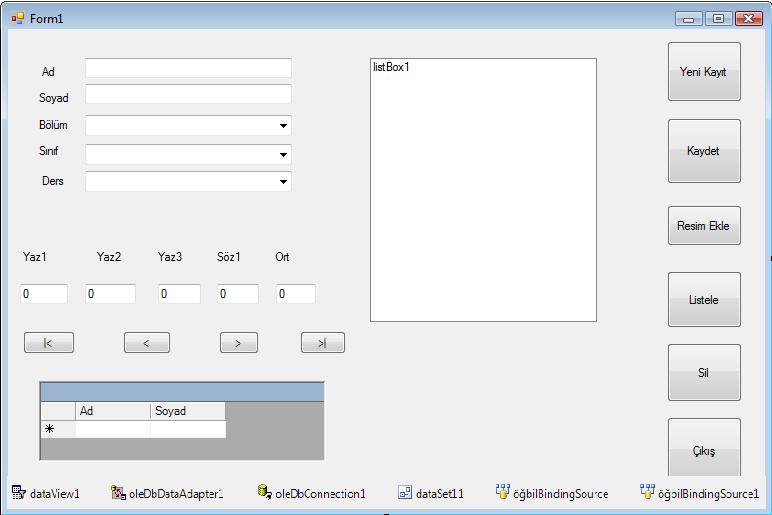
Veritabanı Bağlamak için Öncelikle projemizin kayıtlı bulunduğu dosya içinde WindowsFormsApplication adındaki klasörün içindeki bin klasörüne girip oradanda Debug Adlı klasör içine girip MS accesste oluşturduğumuz veritabanı dosyasını oluşturuyoruz..Bu işlemi yaptıktan sonra projemizi açıp toolboxda Data altında bulunan kontrollere OledbAdapter,OledbConnection,Dataview ve DataGrid kontrollerini eklememiz gerekir.. Bunun için toolboxda Data üzerine sağ tuş Choose İtems a tıklarayarak Adı geçen kontrolleri gelen pencerede seçerek toolbox a ekleriz.. Ardından OledbAdapter Kontrolüne çift tıklayarak Veritabanını bağlama işlemine başlayacağız..OledbAdapter e tıkladıktan sonra gelen pencereden New Connection diyoruz.. Gelen pencerede Data Source karşısındaki Change Butonuna basarak gelen pencereden other Seçilip OK butona basarız..Bu İşlemi yaptıktan sonra OLE DB Provider ın Altında bulunan açılır liste kutusundan Microsoft Jet 4.0 OLE DB Provider Seçildikten sonra Data Links Butonuna tıklarız.1.Veritabanı adını seçiniz veya girin karşısında … Butonuna basarak daha önce oluşturduğumuz access veritabanı dosyasını seçeriz..Bu işlemi yaptıktan sonra Bağlantıyı sına Butonuna basarak Bağlantımızın düzgün olup olmadığını kontrol ederiz..Sınama başarılı oldu mesajı alındıktan sonra Tamam Butonuna basarız.. Ekranda kalan penceremizde Test Connection Butona basarak YineBağlantımızın doğru olup olmadığını kontrol ederiz.. Test connection succeeded mesajını aldıktan sonra OK butonuna basarız..Ekranda kalan pencereden NExt Diyerek devam ederiz.. Next butonuna bastıktan sonra Bir mesaj gelecektir bu mesaja evet diyerek geçeriz.Yine next butonuna basarak devam ederiz. Next dedikten sonra gelen pencerede Query Builder butonuna basarız..Gelen pencerede accesste oluşturduğumuz tablo(lar) görüntülenecektir..Burada Kullanacağımız tablo(lar) seçip add butonana basarız.. Add butonuna basıp tablomuzu ekledikten sonra close butonuna basarak pencereyi kapatırız.. Ekrandaki pencerede tablodaki tüm alanların gözükmesini istiyorsak All Columns seçeneğine tıklayarak Execute Query butununa basarak Oluşturduğumuz tablodaki verileri ve alanları görüntüleriz.. Bu işlemi yaptıktan sonra OK butonuna basarak Ekranda bulunan pencereden Next butonuna basarız .. Ardından Gelen pencereden Finish Butonuna basarız ve pencere kapanır..
Ardından toolboxda bulunan Data ya eklediğimiz kontrollerden Dataviewe çift tıklayarak Formumuzun altına ekleriz..Bu işlemden sonra formumuzun altında bulunan oledbAdapter Üzerine gelip sağ tuş Generate Dataset e tıklarız gelen pencerede OK butonuna basarız..Bu işlemi yaptıktan sonra formumuzun altına eklediğimiz dataview i seçip properties penceresinden Table Özelliğine tıklatıp Dataset11 altında bulunan tablomuzu seçeriz. bu işlemi yaptıktan sonra Yine toolboxda data içine ekledğimiz DataGrid kontrolünü formumuza ekliyoruz..Datagrid i ekledikten sonra datagrid i seçip properties penceresinde DataSource özelliğine tıklayıp Form1 List İnstances in Altında bulunan Dataviewi seçiyoruz..Eklenen textboxları veritabanı bağlatısı için textbox seçiyoruz. Properties penceresinden DataBindings + işaretine tıklanır.Text — Other Data Sources — Form1 List İnstances– Dataset11 — bağlantı kurcağınız access dosyasının ilgili alanı seçilir. Bu işlemide yaptıktan sonra Veritabanı bağlama işlemi başarı ile sona ermiştir…
Yukarıda anlatılan işlemlerin resimli anlatımı için link : https://www.gorselprogramlama.com/oledbadapter-olusturma-resimli-anlatim-cnetcnet
silme ve değiştir işlemlerinde sorun yaşıyorsanız yukarıdaki linki tıkladıktan sonra alt kısımdaki yorumlara bakınız.
[code language=”Csharp”]
public partial class Form1 : Form
{
int yaz1, yaz2, yaz3, sz1, a;
long ort;
int not = 0;
public Form1()
{
InitializeComponent();
}
private void Form1_Load(object sender, EventArgs e)
{
oleDbDataAdapter1.Fill(dataSet11, "öğ_bil");
comboBox1.Items.Add("Bilişim Teknolojileri");
comboBox1.Items.Add("Elektrik ve Elektronik Teknolojileri");
comboBox1.Items.Add("Metal Teknolojileri");
comboBox1.Items.Add("Ahşap Teknolojileri");
comboBox1.Items.Add("Makine Ressamlığı");
comboBox1.Items.Add("Kimya Teknolojileri");
comboBox3.Items.Add("Nesne Tabanlı Proğramlama");
comboBox3.Items.Add("Veri Tabanı");
comboBox3.Items.Add("Grafik Animasyon");
comboBox3.Items.Add("Matematik");
comboBox3.Items.Add("Geometri");
comboBox3.Items.Add("Analitik Geometri");
comboBox3.Items.Add("Edebiyat");
comboBox3.Items.Add("Dil ve Anlatım");
comboBox3.Items.Add("Din Kültürü");
comboBox3.Items.Add("Kimya");
comboBox3.Items.Add("Biyoloji");
comboBox3.Items.Add("Fizik");
}
private void oleDbDataAdapter1_RowUpdated(object sender, System.Data.OleDb.OleDbRowUpdatedEventArgs e)
{
}
private void button1_Click(object sender, EventArgs e)
{
this.BindingContext[dataSet11, "öğ_bil"].Position = 0;
}
private void button2_Click(object sender, EventArgs e)
{
this.BindingContext[dataSet11, "öğ_bil"].Position += 1;
}
private void button3_Click(object sender, EventArgs e)
{
this.BindingContext[dataSet11, "öğ_bil"].Position -= 1;
}
private void textBox1_TextChanged(object sender, EventArgs e)
{
}
private void button4_Click(object sender, EventArgs e)
{
this.BindingContext[dataSet11, "öğ_bil"].Position = this.BindingContext[dataSet11, "öğ_bil"].Count – 1;
}
private void öğbilBindingSource1_CurrentChanged(object sender, EventArgs e)
{
}
private void button8_Click(object sender, EventArgs e)
{
this.BindingContext[dataSet11, "öğ_bil"].AddNew();
}
private void button5_Click(object sender, EventArgs e)
{
this.BindingContext[dataSet11, "öğ_bil"].EndCurrentEdit();
oleDbDataAdapter1.Update(dataSet11);
}
private void button10_Click(object sender, EventArgs e)
{
DialogResult cevap;
cevap = MessageBox.Show("Kayıdı Silmek İstediğinizden Eminmisiniz…", "Uyarı", MessageBoxButtons.YesNo, MessageBoxIcon.Question);
if (cevap == DialogResult.Yes)
{
int kayit_no;
kayit_no = this.BindingContext[dataSet11, "öğ_bil"].Position;
this.BindingContext[dataSet11, "öğ_bil"].RemoveAt(kayit_no);
this.BindingContext[dataSet11, "öğ_bil"].Position -= 1;
this.BindingContext[dataSet11, "öğ_bil"].EndCurrentEdit();
}
else
{
;
}
}
private void comboBox1_SelectedIndexChanged(object sender, EventArgs e)
{
switch (comboBox1.Text)
{
case "Bilişim Teknolojileri":
comboBox2.Items.Clear();
comboBox2.Items.Add("10 tb").ToString();
comboBox2.Items.Add("11 tb").ToString();
comboBox2.Items.Add("12 tb").ToString();
break;
case "Elektrik ve Elektronik Teknolojileri":
comboBox2.Items.Clear();
comboBox2.Items.Add("10 te").ToString();
comboBox2.Items.Add("11 te").ToString();
comboBox2.Items.Add("12 te").ToString();
break;
case "Metal Teknolojileri":
comboBox2.Items.Clear();
comboBox2.Items.Add("10 G ").ToString();
comboBox2.Items.Add("11 G").ToString();
comboBox2.Items.Add("12 G").ToString();
break;
case "Ahşap Teknolojileri":
comboBox2.Items.Clear();
comboBox2.Items.Add("10 H").ToString();
comboBox2.Items.Add("11 H").ToString();
comboBox2.Items.Add("12 H").ToString();
break;
case "Makine Ressamlığı":
comboBox2.Items.Clear();
comboBox2.Items.Add("10 F").ToString();
comboBox2.Items.Add("11 F").ToString();
comboBox2.Items.Add("12 F").ToString();
break;
case "Kimya Teknolojileri":
comboBox2.Items.Clear();
comboBox2.Items.Add("10 M").ToString();
comboBox2.Items.Add("11 M").ToString();
comboBox2.Items.Add("12 M").ToString();
break;
}
}
private void comboBox2_SelectedIndexChanged(object sender, EventArgs e)
{
}
private void textBox3_TextChanged(object sender, EventArgs e)
{
try
{
yaz1 = int.Parse(textBox3.Text);
yaz2 = int.Parse(textBox4.Text);
yaz3 = int.Parse(textBox5.Text);
sz1 = int.Parse(textBox6.Text);
ort = ((yaz1 + yaz2 + yaz3 + sz1) / 4);
textBox7.Text = ort.ToString();
}
catch
{
;
}
}
private void textBox4_TextChanged(object sender, EventArgs e)
{
try
{
yaz1 = int.Parse(textBox3.Text);
yaz2 = int.Parse(textBox4.Text);
yaz3 = int.Parse(textBox5.Text);
sz1 = int.Parse(textBox6.Text);
ort = ((yaz1 + yaz2 + yaz3 + sz1) / 4);
textBox7.Text = ort.ToString();
}
catch
{
;
}
}
private void textBox5_TextChanged(object sender, EventArgs e)
{
try
{
yaz1 = int.Parse(textBox3.Text);
yaz2 = int.Parse(textBox4.Text);
yaz3 = int.Parse(textBox5.Text);
sz1 = int.Parse(textBox6.Text);
ort = ((yaz1 + yaz2 + yaz3 + sz1) / 4);
textBox7.Text = ort.ToString();
}
catch
{
;
}
}
private void textBox6_TextChanged(object sender, EventArgs e)
{
try
{
yaz1 = int.Parse(textBox3.Text);
yaz2 = int.Parse(textBox4.Text);
yaz3 = int.Parse(textBox5.Text);
sz1 = int.Parse(textBox6.Text);
ort = ((yaz1 + yaz2 + yaz3 + sz1) / 4);
textBox7.Text = ort.ToString();
}
catch
{
;
}
}
private void textBox7_TextChanged(object sender, EventArgs e)
{
try
{
a = int.Parse(textBox7.Text );//a değişkeni labelın içine atandı
if (a <= 24 &amp;amp;amp;amp;amp;amp;amp;&amp;amp;amp;amp;amp;amp;amp; a > 0)//a 24 den küçük 0 dan büyük olduğunda
not = 0;//not 0
else
if (a <= 44 &amp;amp;amp;amp;amp;amp;amp;&amp;amp;amp;amp;amp;amp;amp; a > 24)//a 44 den küçük 24 den büyük olduğunda
not = 1;//not 1
else
if (a <= 54 &amp;amp;amp;amp;amp;amp;amp;&amp;amp;amp;amp;amp;amp;amp; a > 44)//a 54 den küçük 44 den büyük olduğunda
not = 2;//not 2
else
if (a <= 69 &amp;amp;amp;amp;amp;amp;amp;&amp;amp;amp;amp;amp;amp;amp; a > 54)//a 54 den küçük 44 den büyük olduğunda
not = 3;//not 3
else
if (a <= 84 &amp;amp;amp;amp;amp;amp;amp;&amp;amp;amp;amp;amp;amp;amp; a > 69)//a 84 den küçük 69 dan büyük olduğunda
not = 4;//not 4
else
if (a <= 100 &amp;amp;amp;amp;amp;amp;amp;&amp;amp;amp;amp;amp;amp;amp; a > 84)//a 100 den küçük 84 den büyük olduğunda
not = 5;//not 5
switch (not)//not değerleri girildi.
{
case 0://case 0 durumunda
textBox7.Text = "0";//label ın içine 0 atandı
break;
case 1://case 1 durumunda
textBox2.Text = "1";//textin içine 1 atandı
break;
case 2://case 2 durumunda
textBox2.Text = "2";//textin içine 2 atandı
break;
case 3://case 3 durumunda
textBox2.Text = "3";//textin içine 3 atandı
break;
case 4://case 4 durumunda
textBox2.Text = "4";//textin içine 4 atandı
break;
case 5://case 5 durumunda
textBox2.Text = "5";//textin içine 5 atandı
break;
}
}
catch
{
;
}
}
private void button9_Click(object sender, EventArgs e)
{
Close();
}
private void button6_Click(object sender, EventArgs e)
{
Form2 frm2 = new Form2();
frm2.Show();
this.Hide();
}
private void button7_Click(object sender, EventArgs e)
{
listBox1.Items.Add(textBox1.Text);
listBox1.Items.Add(textBox2.Text);
listBox1.Items.Add(comboBox1.Text);
listBox1.Items.Add(comboBox2.Text);
listBox1.Items.Add(textBox7.Text);
}
}[/code]
Programalr gerçekten super bende bilgisayar teknıolojileri ve programlama bölümü öğrencisiyim gerçekten işimizi gördük ama veri tabanlı örnekler daha fazla olsa iyi olur bende de kreş otomasyonu var onu size nasıl ulaştırabılrım buraya eklemeniz için…