Paintteki kalem aracının benzerini vb 6.0 yapalm.. 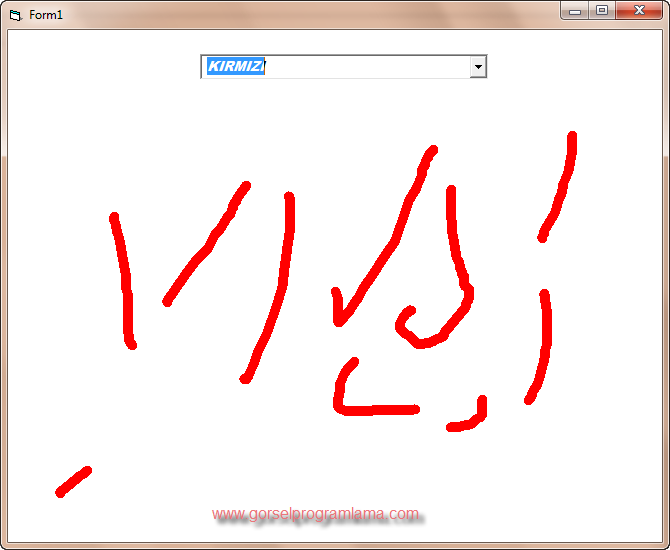
istediğimiz rengi yukarıdan seçiyoz ve daha sonra fare ile formun üzerine istediğimiz gibi çizebiliyoruz.. programda tek combobox kullanılmıştır.
ComboBox’a yazılacak renkler sırasıyla;
KIRMIZI
MAVİ
YEŞİL
SARI
TURKUAZ YEŞİL
MOR
GÜMÜŞ
Renkleri yazdıktan sonra programa yazılacak kodlar;
[code=’VB’]Private Sub Form_MouseDown(Button As Integer, Shift As Integer, X As Single, Y As Single)
x1 = X
y1 = Y
End Sub[/code]
[code=’VB’]Private Sub Form_MouseMove(Button As Integer, Shift As Integer, X As Single, Y As Single)
If Combo1.ListIndex = 0 Then
If Button = 1 Then
Line (x1, y1)-(X, Y), RGB(256, 0, 0)
x1 = X
y1 = Y
End If
End If
If Combo1.ListIndex = 1 Then
If Button = 1 Then
Line (x1, y1)-(X, Y), RGB(0, 0, 256)
x1 = X
y1 = Y
End If
End If
If Combo1.ListIndex = 2 Then
If Button = 1 Then
Line (x1, y1)-(X, Y), RGB(0, 256, 0)
x1 = X
y1 = Y
End If
End If
If Combo1.ListIndex = 3 Then
If Button = 1 Then
Line (x1, y1)-(X, Y), RGB(256, 256, 0)
x1 = X
y1 = Y
End If
End If
If Combo1.ListIndex = 4 Then
If Button = 1 Then
Line (x1, y1)-(X, Y), RGB(0, 256, 256)
x1 = X
y1 = Y
End If
End If
If Combo1.ListIndex = 5 Then
If Button = 1 Then
Line (x1, y1)-(X, Y), RGB(256, 0, 256)
x1 = X
y1 = Y
End If
End If
If Combo1.ListIndex = 6 Then
If Button = 1 Then
Line (x1, y1)-(X, Y), RGB(200, 200, 200)
x1 = X
y1 = Y
End If
End If
End Sub[/code]
Benim proje ödevim var . Bu programı yapmaya çalışıyorum ama bi türlü olmuyor .
Rica etsem , yardım edebilirmisiniz. visual basic.net te bazı komutlar degişmişte yapamadım
proje isteklerinizi gorselprogram@gmail.com adresine mail atınız.
Ya ben sadece vb.net te degişen kodları öğrenmek istiyorum…
Aynısını vb.net nasıl yaparız ?