Temsilci-Delege-Delegate C# Ders67
Daha fazla bilgi için : www.gorselprogramlama.com
Temsilci-Delege-Delegate: Program içerisinde bir veya birden fazla metodu işaret eden nesnelerde temsilci denir.Temsilciler metotların bellekteti adresleri tutulmak istediğinde kullanılabilir.Temsilci tanımı delegate anahtar kelimesiyle tanımlanır.Bir temsilciyi bir metodu göstermesi için kullanmak gerekirse new ile oluşturulur ve işaret edeceği metodu ona parametre olarak veririz.
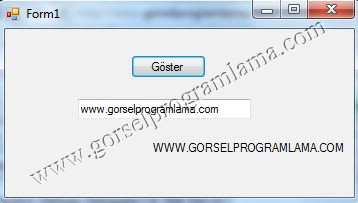
Örnek: sınıf içerisinde buyukHarf metodu oluşturalım.Bu metodu temsilci yöntemiyle çağıralım.
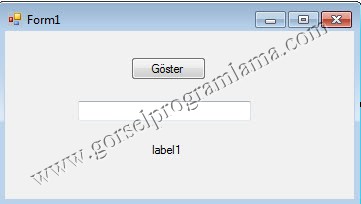
[code lang=”csharp”]
using System;
using System.Collections.Generic;
using System.ComponentModel;
using System.Data;
using System.Drawing;
using System.Linq;
using System.Text;
using System.Windows.Forms;
namespace temsilci
{//Daha fazla bilgi için : www.gorselprogramlama.com
public partial class Form1 : Form
{
public Form1()
{
InitializeComponent();
}
private void goster_Click(object sender, EventArgs e)
{
MyClass m = new MyClass();
cumle c = new cumle(m.buyukHarf);
label1.Text = c(textBox1.Text);
}
}//Daha fazla bilgi için : www.gorselprogramlama.com
}
delegate string cumle(string c1);
public class MyClass
{
public string buyukHarf(string s)
{
return s.ToUpper();
}
}
[/code]
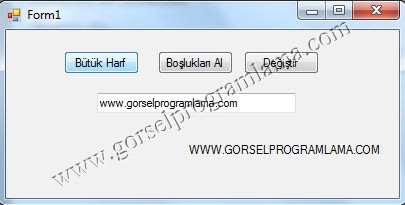
Örnek: Şimdide üç farklı metot hazırlayalım bunu temsilci yöntemiyle çağıralım.
[code lang=”csharp”]using System;
using System.Collections.Generic;
using System.ComponentModel;
using System.Data;
using System.Drawing;
using System.Linq;
using System.Text;
using System.Windows.Forms;
namespace temsilci
{
public partial class Form1 : Form
{
public Form1()
{
InitializeComponent();
}
private void buyukHarf_Click(object sender, EventArgs e)
{
MyClass m = new MyClass();
temsil t = new temsil(m.buyukHarf);
label1.Text=t(textBox1.Text);
}
private void bosluklariAl_Click(object sender, EventArgs e)
{ //Daha fazla bilgi için : www.gorselprogramlama.com
MyClass m = new MyClass();
temsil t = new temsil(m.bosluklariAl);
label1.Text = t(textBox1.Text);
}
private void degistir_Click(object sender, EventArgs e)
{
MyClass m = new MyClass();
temsil t = new temsil(m.degistir);
label1.Text = t(textBox1.Text);
}
}
}
delegate string temsil(string a);
public class MyClass
{
public string buyukHarf(string s)
{
return s.ToUpper();
}
public string bosluklariAl(string s)
{
return s.Trim();
}
public string degistir(string s)
{
return s.Replace(‘+’, ‘-‘);
} //Daha fazla bilgi için : www.gorselprogramlama.com
}
[/code]
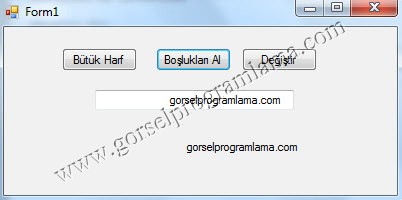
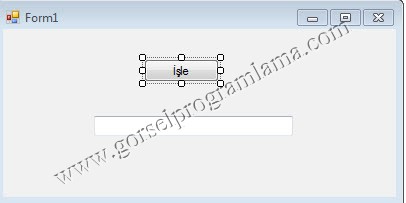
Örnek: Yukarıdaki örnekte temsilciyi üç defa ayrı ayrı tanımladık.Temsilci ile birden fazla metodu aynı çağırabiliriz.Bunun için += kullanıyoruz.Çıkarmak içinde -= kullanıyoruz.Aşağıda yaptğımız örnekte daha iyi anlaşılacaktır.
[code lang=”csharp”]
using System;
using System.Collections.Generic;
using System.ComponentModel;
using System.Data;
using System.Drawing;
using System.Linq;
using System.Text;
using System.Windows.Forms;
namespace temsilci
{//Daha fazla bilgi için : www.gorselprogramlama.com
public partial class Form1 : Form
{
public Form1()
{
InitializeComponent();
}
private void isle_Click(object sender, EventArgs e)
{
MyClass m = new MyClass();
temsil t = new temsil(m.buyukHarf);
t += new temsil(m.degistir);
t += new temsil(m.bosluklariAl);
t(textBox1.Text);
}
}
}//Daha fazla bilgi için : www.gorselprogramlama.com
delegate void temsil(string a);
public class MyClass
{
public void buyukHarf(string s)
{
MessageBox.Show(s.ToUpper()+" String büyük harflere çevrildi");
}
public void bosluklariAl(string s)
{
MessageBox.Show(s.Trim() + " Stringdeki boşluklar alındı");
}
public void degistir(string s)
{
MessageBox.Show(s.Replace(‘+’, ‘-‘) + " Stringdeki artılar eksi olarak değiştirildi");
}
}
[/code]
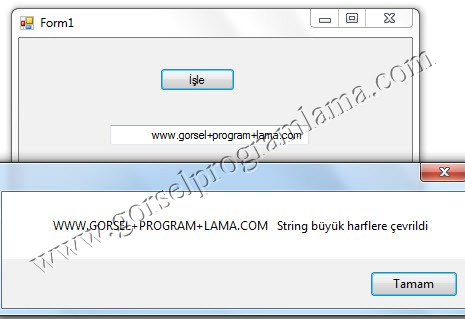
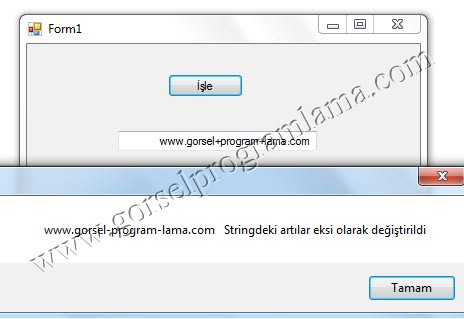
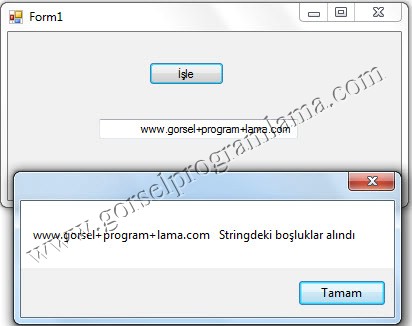
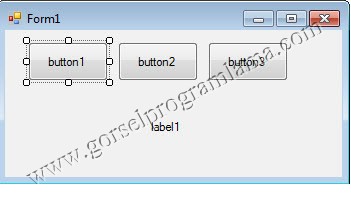
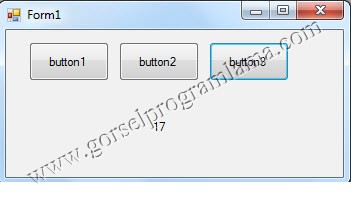
Örnek: Aşağıdaki örnekte buton1 click olayındaki kodları temsilci yöntemiyle buton2 ve buton3 aktarıldığını görüyorsunuz.
[code lang=”csharp”]using System;
using System.Collections.Generic;
using System.ComponentModel;
using System.Data;
using System.Drawing;
using System.Linq;
using System.Text;
using System.Windows.Forms;
namespace bir_butonun_kodlarını_diger_butonlara_uygula
{
public partial class Form1 : Form
{
public Form1()
{
InitializeComponent();
}
private void button1_Click(object sender, EventArgs e)
{
Random r = new Random();
label1.Text = r.Next(50).ToString();
}
private void button2_Click(object sender, EventArgs e)
{
button2.Click+=new System.EventHandler(button1_Click);
}
private void button3_Click(object sender, EventArgs e)
{//Daha fazla bilgi için : www.gorselprogramlama.com
button3.Click += new System.EventHandler(button1_Click);
}
}//Daha fazla bilgi için : www.gorselprogramlama.com
}
[/code]
Güzel yazı, teşekkürler.
Merhabalar orada tanımlamış olduğunuz MyClass nedir ben onu çözemedim yardımcı olur musunuz?