textbox’a girilen sayının yarı mükemmel sayı olup olmadığını label’e yazma Vb.Net
Soru :
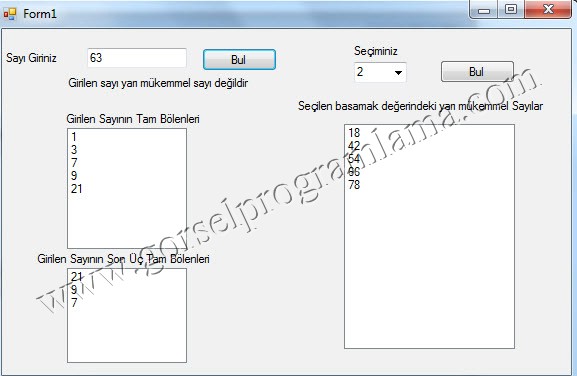
1.Kullanıcının TextBox’ a girdiği herhangi bir sayının yarı mükemmel sayı olup olmadığı kontrol edilerek sonuç kullanıcıya geri bildirilecek.
2. Kullanıcı istediği basamak değerini ComboBox’ tan seçerek ilgili basamak değerindeki yarı mükemmel sayıların listesini sıralı bir şekilde ekranda görebilecek. (Basamak sayısı en fazla 4 olacak.)
Yarı Mükemmel Sayı Tanımı: Bir sayının kendisi hariç, son üç tamsayı bölenlerinin toplamı sayının kendisini veriyorsa bu sayıya yarı mükemmel sayı denir.
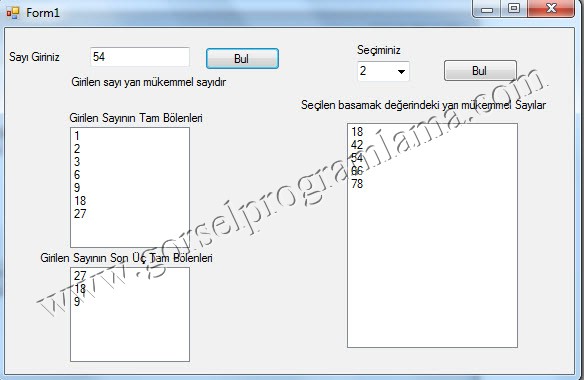
Örnek: 18 = 1, 2, 3, 6, 9, 18 (Son üç tamsayı bölenleri toplamı: 3+6+9 = 18)…………….
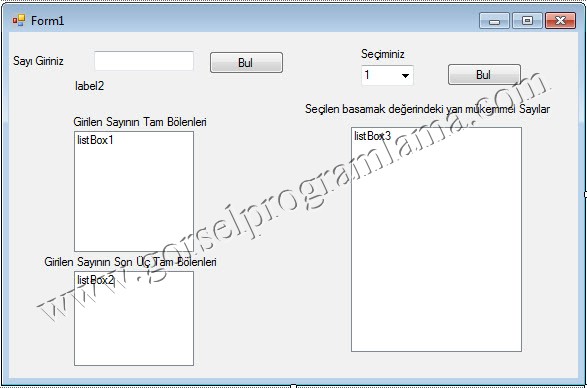
Aşağıdaki form görüntüsünü oluşturuyoruz.
[code lang=”vb”]Private Sub btnBul_Click(sender As Object, e As EventArgs)
listBox1.Items.Clear()
listBox2.Items.Clear()
Dim sayac As Integer = 0, sonUcToplam As Integer = 0, girilenSayi As Integer = Integer.Parse(textBox1.Text)
Dim sayilar As Integer() = New Integer(99) {}
‘https://www.gorselprogramlama.com
For i As Integer = 1 To girilenSayi – 1
If girilenSayi Mod i = 0 Then
sayilar(sayac) = i
sayac += 1
End If
Next
For i As Integer = 0 To sayac – 1
‘https://www.gorselprogramlama.com
listBox1.Items.Add(sayilar(i))
Next
If sayac >= 3 Then
For i As Integer = sayac – 1 To sayac – 3 Step -1
listBox2.Items.Add(sayilar(i))
sonUcToplam += sayilar(i)
Next
End If
‘https://www.gorselprogramlama.com
If sayac >= 3 AndAlso girilenSayi = sonUcToplam Then
label2.Text = "Girilen sayı yarı mükemmel sayıdır"
Else
label2.Text = "Girilen sayı yarı mükemmel sayı değildir"
End If
End Sub
Private Sub btnBul2_Click(sender As Object, e As EventArgs)
listBox3.Items.Clear()
If comboBox1.Text = "1" Then
For k As Integer = 1 To 9
‘https://www.gorselprogramlama.com
Dim sayac As Integer = 0, sonUcToplam As Integer = 0
Dim sayilar As Integer() = New Integer(99) {}
For i As Integer = 1 To k – 1
If k Mod i = 0 Then
sayilar(sayac) = i
sayac += 1
End If
Next
‘https://www.gorselprogramlama.com
If sayac >= 3 Then
For i As Integer = sayac – 1 To sayac – 3 Step -1
sonUcToplam += sayilar(i)
Next
End If
If sayac >= 3 AndAlso k = sonUcToplam Then
listBox3.Items.Add(k)
End If
Next
End If
‘https://www.gorselprogramlama.com
If comboBox1.Text = "2" Then
For k As Integer = 10 To 99
‘https://www.gorselprogramlama.com
Dim sayac As Integer = 0, sonUcToplam As Integer = 0
Dim sayilar As Integer() = New Integer(99) {}
For i As Integer = 1 To k – 1
If k Mod i = 0 Then
sayilar(sayac) = i
sayac += 1
End If
Next
‘https://www.gorselprogramlama.com
If sayac >= 3 Then
For i As Integer = sayac – 1 To sayac – 3 Step -1
sonUcToplam += sayilar(i)
Next
End If
If sayac >= 3 AndAlso k = sonUcToplam Then
listBox3.Items.Add(k)
End If
Next
End If
If comboBox1.Text = "3" Then
For k As Integer = 100 To 999
Dim sayac As Integer = 0, sonUcToplam As Integer = 0
‘https://www.gorselprogramlama.com
Dim sayilar As Integer() = New Integer(999) {}
For i As Integer = 1 To k – 1
If k Mod i = 0 Then
sayilar(sayac) = i
sayac += 1
End If
Next
If sayac >= 3 Then
For i As Integer = sayac – 1 To sayac – 3 Step -1
‘https://www.gorselprogramlama.com
sonUcToplam += sayilar(i)
Next
End If
If sayac >= 3 AndAlso k = sonUcToplam Then
listBox3.Items.Add(k)
End If
Next
End If
If comboBox1.Text = "4" Then
For k As Integer = 1000 To 9999
Dim sayac As Integer = 0, sonUcToplam As Integer = 0
‘https://www.gorselprogramlama.com
Dim sayilar As Integer() = New Integer(999) {}
For i As Integer = 1 To k – 1
If k Mod i = 0 Then
sayilar(sayac) = i
sayac += 1
End If
Next
If sayac >= 3 Then
‘https://www.gorselprogramlama.com
For i As Integer = sayac – 1 To sayac – 3 Step -1
sonUcToplam += sayilar(i)
Next
End If
If sayac >= 3 AndAlso k = sonUcToplam Then
listBox3.Items.Add(k)
End If
‘https://www.gorselprogramlama.com
Next
End If
End Sub
[/code]
Bu programın V.b 6.0 da tekrardan yapabilirmisiniz??
vb 6.0 ile yapılan yarı mükemmel sayı örneği yayınlandı link: http://www.gorselprogramlama.com/textboxa-girilen-sayinin-yari-mukemmel-sayi-olup-olmadigini-labele-yazma-vb-6-0