Formumuzu aşağıdaki gibi oluşturuyoruz;
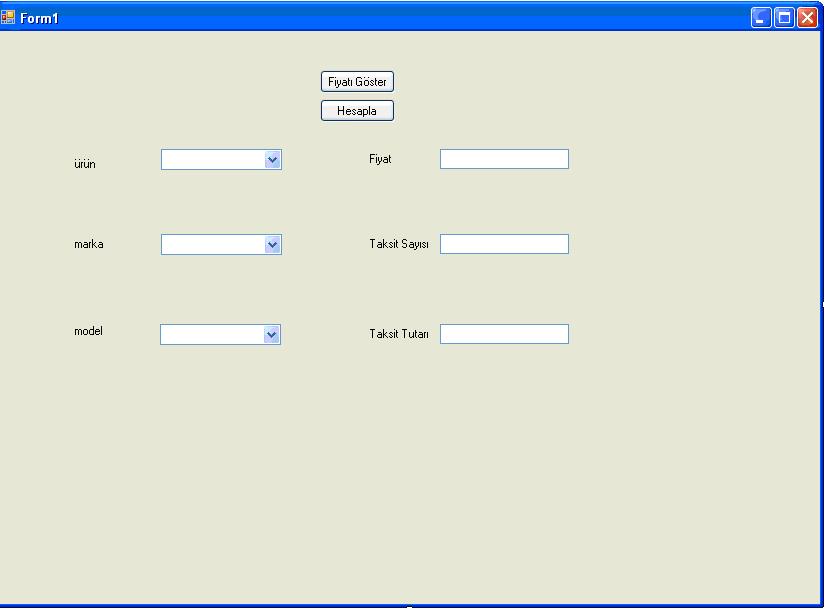
[code language=”Csharp”]//İlk önce form load’dan başlıyoruz
private void Form1_Load(object sender, EventArgs e)
//ilk önce combobox1’in içine ürünlerimizi yazalım
comboBox1.Items.Add("Notebook");
comboBox1.Items.Add("Fotoğraf Mak.");
comboBox1.Items.Add("LCD Monitör");
//görünürlük/gizlilik ayarlarını yapalım
comboBox1.Visible = true;
comboBox2.Visible = false;
comboBox3.Visible = false;
label1.Visible = false;
label2.Visible = false;
label3.Visible = false;
textBox1.Visible = false;
textBox2.Visible = false;
textBox3.Visible = false;
button1.Visible = false;
//şimdi combobox1’in kodlarını yazalım
private void comboBox1_SelectedIndexChanged(object sender, EventArgs e)
//görünürlük/gizlilik ayarlarını yapalım
comboBox2.Visible = true;
comboBox3.Visible = false;
//combobox1’de ki seçimimize göre combobox2’ye değer ataması için aşağıdaki işlemleri yapacağız
if (comboBox1.Text == "Notebook")
{
comboBox2.Items.Add("HP");
comboBox2.Items.Add("Dell");
comboBox2.Items.Add("Toshiba");
}
if (comboBox1.Text == "Fotoğraf Mak.")
{
comboBox2.Items.Add("Canon");
comboBox2.Items.Add("Panasonic");
comboBox2.Items.Add("Sanyo");
}
if (comboBox1.Text == "LCD Monitör")
{
comboBox2.Items.Add("Phılıps");
comboBox2.Items.Add("LG");
comboBox2.Items.Add("BENQ");
}
//şimdi combobox2’in kodlarını yazalım
private void comboBox2_SelectedIndexChanged(object sender, EventArgs e)
//görünürlük/gizlilik ayarlarını yapalım
comboBox3.Visible = true;
//combobox2’de ki seçimimize göre combobox3’ye değer ataması için aşağıdaki işlemleri yapacağız
if (comboBox2.Text == "HP")
{
comboBox3.Items.Add("1330-A64P3");
comboBox3.Items.Add("XPS-M1530"); comboBox3.Items.Add("INSPIRON1520"); comboBox3.Items.Add("STUDIO1537");
}
if (comboBox2.Text == "Dell")
{ comboBox3.Items.Add("PAV.DV9610ET");
comboBox3.Items.Add("PAV.DV5-1230ET");
comboBox3.Items.Add("PAV.DV-2999ET");
comboBox3.Items.Add("TABLET TX2630TR");
}
if (comboBox2.Text == "Toshiba")
{
comboBox3.Items.Add("NB100-125");
comboBox3.Items.Add("A350-13C");
comboBox3.Items.Add("A300-1ND");
comboBox3.Items.Add("R600-10U");
}
if (comboBox2.Text == "Canon")
{
comboBox3.Items.Add("IXUS 82");
comboBox3.Items.Add("POWERSHOT E1");
comboBox3.Items.Add("CANON IXUS 85 IS");
comboBox3.Items.Add("SX 110B");
}
if (comboBox2.Text == "Panasonic")
{
comboBox3.Items.Add("DMC-FS3EG-K");
comboBox3.Items.Add("DMC-FS5");
comboBox3.Items.Add("DMC-LZ8");
}
if (comboBox2.Text == "Sanyo")
{
comboBox3.Items.Add("VPC-S880");
}
if (comboBox2.Text == "Phılıps")
{
comboBox3.Items.Add("18.5191EW9FB");
comboBox3.Items.Add("19 190CW9FB");
comboBox3.Items.Add("21.6 220VW9FB");
}
if (comboBox2.Text == "LG")
{
comboBox3.Items.Add("18.5 W1941S-PF");
comboBox3.Items.Add("22 W2234S-BN");
comboBox3.Items.Add("19 L196WSQ-WF");
}
if (comboBox2.Text == "BENQ")
(comboBox3.Items.Add("19 G900WAD");
//şimdi combobox3’ün kodlarını yazalım
private void comboBox3_SelectedIndexChanged(object sender, EventArgs e)
//görünürlük/gizlilik ayarlarını yapalım
label1.Visible = true;
label2.Visible = true;
label3.Visible = true;
textBox1.Visible = true;
textBox2.Visible = true;
textBox3.Visible = true;
button1.Visible = true;
//şimdi fiyat göster buttonunun kodlarını yazalım
private void button1_Click(object sender, EventArgs e)
if (comboBox3.Text == "NB100-125")
textBox1.Text = "1000";
if (comboBox3.Text == "1330-A64P3")
textBox1.Text = "1250";
if (comboBox3.Text == "XPS-M1530")
textBox1.Text = "1350";
if (comboBox3.Text == "INSPIRON1520")
textBox1.Text = "1150";
if (comboBox3.Text == "STUDIO1537")
textBox1.Text = "2000";
if (comboBox3.Text == "PAV.DV9610ET")
textBox1.Text = "1850";
if (comboBox3.Text == "PAV.DV5-1230ET")
textBox1.Text = "1750";
if (comboBox3.Text == "PAV.DV-2999ET")
textBox1.Text = "1500";
if (comboBox3.Text == "TABLET TX2630TR")
textBox1.Text = "2250";
if (comboBox3.Text == "NB100-125")
textBox1.Text = "2000";
if (comboBox3.Text == "A350-13C")
textBox1.Text = "2500";
if (comboBox3.Text == "A300-1ND")
textBox1.Text = "2100";
if (comboBox3.Text == "R600-10U")
textBox1.Text = "2200";
if (comboBox3.Text == "IXUS 82")
textBox1.Text = "1900";
if (comboBox3.Text == "POWERSHOT E1")
textBox1.Text = "1850";
if (comboBox3.Text == "CANON IXUS 85 IS")
textBox1.Text = "2300";
if (comboBox3.Text == "SX 110B")
textBox1.Text = "3000";
if (comboBox3.Text == "DMC-FS3EG-K")
textBox1.Text = "2600";
if (comboBox3.Text == "DMC-FS5")
textBox1.Text = "2500";
if (comboBox3.Text == "DMC-LZ8")
textBox1.Text = "1500";
if (comboBox3.Text == "VPC-S880")
textBox1.Text = "2600";
if (comboBox3.Text == "18.5191EW9FB")
textBox1.Text = "3100";
if (comboBox3.Text == "19 190CW9FB")
textBox1.Text = "3400";
if (comboBox3.Text == "21.6 220VW9FB")
textBox1.Text = "2800";
if (comboBox3.Text == "18.5 W1941S-PF")
textBox1.Text = "2250";
if (comboBox3.Text == "22 W2234S-BN")
textBox1.Text = "3000";
if (comboBox3.Text == "19 L196WSQ-WF")
textBox1.Text = "1750";
if (comboBox3.Text == "19 G900WAD")
textBox1.Text = "1250";
//görünürlük/gizlilik ayarlarını yapalım
comboBox2.Items.Clear();
comboBox3.Items.Clear();
//şimdi fiyat hesapla buttonunun kodlarını yazalım
private void button2_Click(object sender, EventArgs e)
//taksit ile ilgili işlemleri yapalım
double taksit_sayisi, taksit_tutari, pesin;
pesin = Convert.ToDouble(textBox1.Text);
taksit_sayisi = Convert.ToDouble(textBox2.Text);
taksit_tutari = pesin / taksit_sayisi;
textBox3.Text = Convert.ToString(taksit_tutari);[/code]